GUIDE
Customer support chatbot: kinds, prices and setup
A customer support chatbot answers customers from your docs. Here are its three kinds, where their prices start on 24 November 2026, and how to set one up.
Published
A customer support chatbot is software that answers your customers’ questions in a chat, usually on your website, at any hour. An AI one writes each reply from your own help pages and docs, while a scripted one walks the customer through buttons and replies you wrote in advance. For a founder who still answers support, a good one takes the repeat questions off your plate and passes you the ones that need you.
Deacon, our AI customer support agent, works as a customer support chatbot on your site. It answers your customers in seconds from your own pages and files, says so when it doesn’t know, and shows you what they ask about most. There’s a free plan, and it needs no card.
Below are the three kinds of customer support chatbot, what each needs before it answers and how each bills, with every rival price read on the vendor’s own page on 24 November 2026.
What a customer support chatbot does
A customer support chatbot does five jobs, and it’s worth checking each one before you choose. It’s one part of AI customer service, which can also act in your other systems or help a person write replies.
- It answers repeat questions from your docs. Most of what customers ask is already written down, in your help pages, pricing page or setup guide. A support chatbot finds the passages that fit and writes a reply from them in seconds. Deacon answers from your website’s pages, files you upload, text you paste and answers you write, and an answer taken from one of your pages usually links that page.
- It replies in the customer’s language. Deacon replies in the language of the customer’s latest message, even when your docs are only in English, and the chat’s own buttons and lines come in English and 40 other languages. Multilingual chatbot has the detail.
- It asks one question back when a question is vague. “It’s not working” could mean a dozen things. Deacon asks one short question instead of guessing, and after three it stops asking and hands the conversation to you, with one sentence summing up what the customer said.
- It hands over when it can’t help. Some questions need you, such as a refund, a bug or anything about one customer’s account. Deacon always declines questions about a visitor’s own account, invoice or data, whatever your content says, because it can’t see them.
- It asks for a way to reply. When it can’t answer, Deacon’s chat offers an email field under the reply. If your app passes Deacon the name and email of whoever is logged in, the customer won’t have to type theirs.
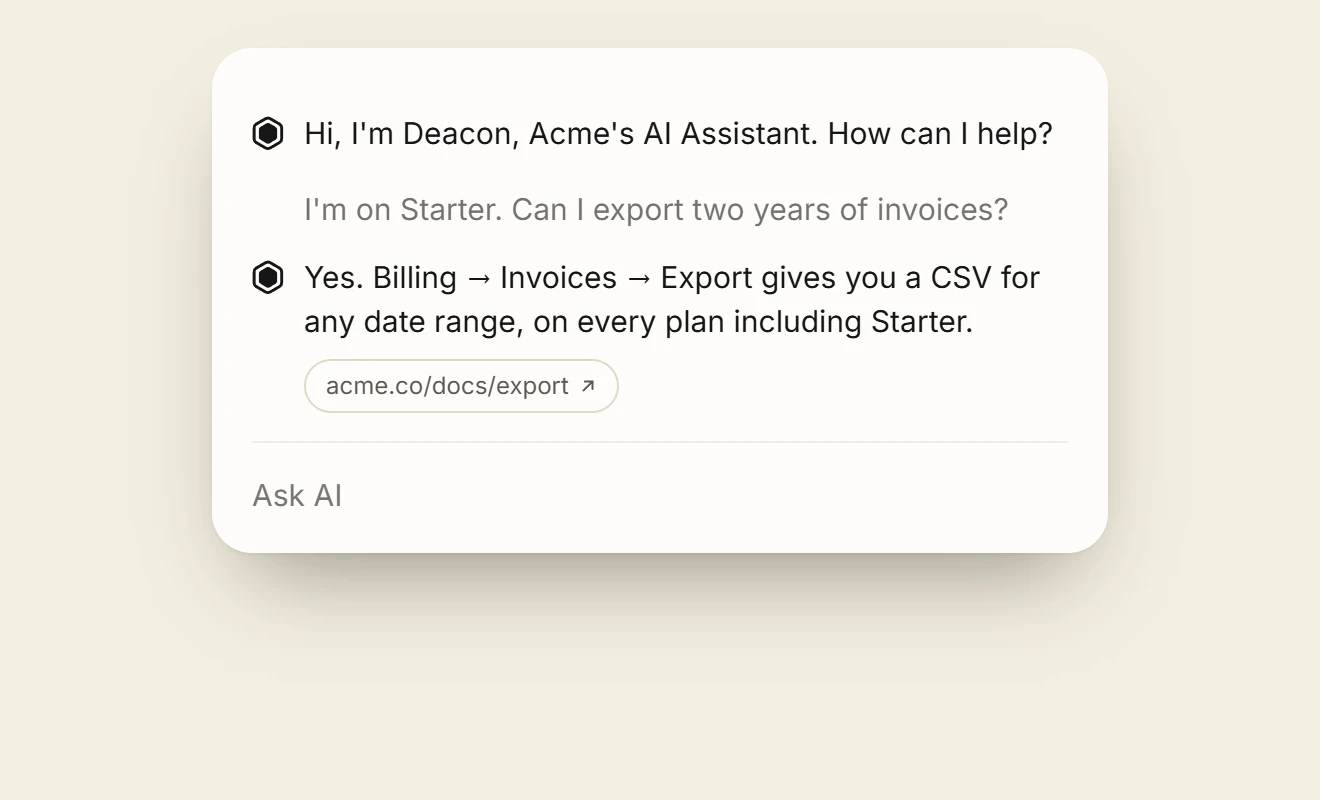
Scripted and AI chatbots
A scripted chatbot follows a decision tree of buttons and set replies that you build, so it answers only the questions you planned for. A customer who types something off the script gets a fallback reply or a menu.
An AI chatbot reads the question as it’s written and writes a reply from the passages of your content that fit, so you build nothing up front beyond the content itself. A script can’t make anything up, but a language model can, so an AI chatbot has to stay within what you’ve written and say when that runs out. AI hallucination covers where made-up answers come from.
Many tools mix the two, with flows for set tasks such as booking a demo and AI for open questions. Deacon answers with AI alone, and there are no flows or decision trees to build. Chatbot examples shows real replies from both kinds, and chatbot vs live chat weighs a bot against a person in the chat.
Three kinds of customer support chatbot
Customer support chatbots come in three kinds, and they differ most in what you need in place before the bot answers anyone.
Inside a helpdesk. Fin, Zendesk’s AI agents, Freshdesk’s Freddy AI Agent and HubSpot’s Customer Agent answer customers from inside a helpdesk, the shared inbox where a support team works through tickets. They suit a team that already runs support there. You pay for the helpdesk’s seats, and for the AI by the outcome, the resolution or the session, so the AI’s part of the bill grows with your traffic. AI help desks sets out how each one counts.
On its own on your site. Deacon, Tidio’s Lyro, Chatling, DocsBot and Chatbase sit on your website as a chat window you add with a snippet of code, with no helpdesk to buy first. Most sell a monthly plan with an allowance counted in answers, conversations or credits, and on the credit-based ones a stronger model uses the credits up faster.
Built yourself on a model. You can build your own on a model from OpenAI, Anthropic or Google, with a search over your docs, a chat window, a way for customers to reach you and a record of each conversation. You pay the model provider by the token, plus hosting, and every part a bought chatbot comes with is yours to build and keep working. Grounding AI explains the search that keeps answers to your docs.
Here are nine of them by kind, with where each one’s price starts, read on the vendor’s own pages on 24 November 2026.
| Chatbot | Kind | What you need before it answers | How it bills the AI | Where the price starts |
|---|---|---|---|---|
| Deacon | On your site | Your website’s address, a file or some text | Answers, a set number each month, on the same model on every plan | A free plan, then set monthly plans on the pricing page |
| Fin | Inside a helpdesk | Intercom’s helpdesk, or Zendesk, Salesforce, Freshdesk or HubSpot | Outcomes, at most one a conversation | $0.99 an outcome plus Intercom’s seats, or $49 a month for the first 50 on another helpdesk |
| Zendesk AI agents | Inside a helpdesk | A Zendesk Suite plan | Automated resolutions past the 5 each agent brings a month | Suite Team, $55 an agent a month billed yearly, then $2.00 a resolution |
| Freddy AI Agent | Inside a helpdesk | Freshdesk Omni, for chat | Sessions, with a chat counted once over 24 hours | Freshdesk Omni Growth, $29 an agent a month billed yearly, with the first 500 sessions included, then $49 for each 100 |
| HubSpot Customer Agent | Inside a helpdesk | HubSpot on Professional or Enterprise | Resolutions, paid in HubSpot Credits | $0.50 a resolution, on top of the plan |
| Tidio Lyro | On your site | Tidio’s chat widget | Conversations, each counted once even after a handoff | Starter with Lyro AI, $39 a month for 50 conversations, Lyro’s and your team’s together |
| Chatling | On your site | Chatling’s widget and your content | Credits, 0.5 to 25 a reply depending on the model | Starter, $25 a month for 1,750 credits |
| DocsBot | On your site | DocsBot’s widget and your docs | Credits, from 1 a message and more on larger models | Personal, $49 a month for 5,000 credits |
| Your own build | Built yourself | A model’s API, a search over your docs and a chat window | The model provider’s price per token, plus hosting | Usage, plus your time |
Deacon
- Kind
- On your site
- What you need before it answers
- Your website’s address, a file or some text
- How it bills the AI
- Answers, a set number each month, on the same model on every plan
- Where the price starts
- A free plan, then set monthly plans on the pricing page
Fin
- Kind
- Inside a helpdesk
- What you need before it answers
- Intercom’s helpdesk, or Zendesk, Salesforce, Freshdesk or HubSpot
- How it bills the AI
- Outcomes, at most one a conversation
- Where the price starts
- $0.99 an outcome plus Intercom’s seats, or $49 a month for the first 50 on another helpdesk
Zendesk AI agents
- Kind
- Inside a helpdesk
- What you need before it answers
- A Zendesk Suite plan
- How it bills the AI
- Automated resolutions past the 5 each agent brings a month
- Where the price starts
- Suite Team, $55 an agent a month billed yearly, then $2.00 a resolution
Freddy AI Agent
- Kind
- Inside a helpdesk
- What you need before it answers
- Freshdesk Omni, for chat
- How it bills the AI
- Sessions, with a chat counted once over 24 hours
- Where the price starts
- Freshdesk Omni Growth, $29 an agent a month billed yearly, with the first 500 sessions included, then $49 for each 100
HubSpot Customer Agent
- Kind
- Inside a helpdesk
- What you need before it answers
- HubSpot on Professional or Enterprise
- How it bills the AI
- Resolutions, paid in HubSpot Credits
- Where the price starts
- $0.50 a resolution, on top of the plan
Tidio Lyro
- Kind
- On your site
- What you need before it answers
- Tidio’s chat widget
- How it bills the AI
- Conversations, each counted once even after a handoff
- Where the price starts
- Starter with Lyro AI, $39 a month for 50 conversations, Lyro’s and your team’s together
Chatling
- Kind
- On your site
- What you need before it answers
- Chatling’s widget and your content
- How it bills the AI
- Credits, 0.5 to 25 a reply depending on the model
- Where the price starts
- Starter, $25 a month for 1,750 credits
DocsBot
- Kind
- On your site
- What you need before it answers
- DocsBot’s widget and your docs
- How it bills the AI
- Credits, from 1 a message and more on larger models
- Where the price starts
- Personal, $49 a month for 5,000 credits
Your own build
- Kind
- Built yourself
- What you need before it answers
- A model’s API, a search over your docs and a chat window
- How it bills the AI
- The model provider’s price per token, plus hosting
- Where the price starts
- Usage, plus your time
Try Deacon for free
Install DeaconWhat a support chatbot needs besides answers
Every chatbot here answers questions. Before you choose one, check these six things as well. They cover the customers it can’t help and the time it saves you, and each comes with what Deacon does.
It says when it doesn’t know
A chatbot that guesses can promise a customer a refund policy you don’t have. When your content doesn’t cover a question, Deacon says so plainly and names what was asked, as in “I don’t have the answer to that. Leave your email below and the team will get back to you about invoices in euros.” It never hints at the answer either way. When the customer leaves an address in the field under that reply, the conversation shows as unread in your dashboard.
It gets the customer to a person the first time
A customer who asks for a person should reach one on the first ask. Deacon replies that the team has been told and will reply right there in the chat. You see it in your dashboard at once, and the owners on your team get an email about three minutes later unless someone has already seen it. Your reply from Conversations appears in the customer’s chat under your name, the chat stays open for three days while you owe them one, and if they don’t read it there, it’s emailed to the address they left. Human handoff walks through it.
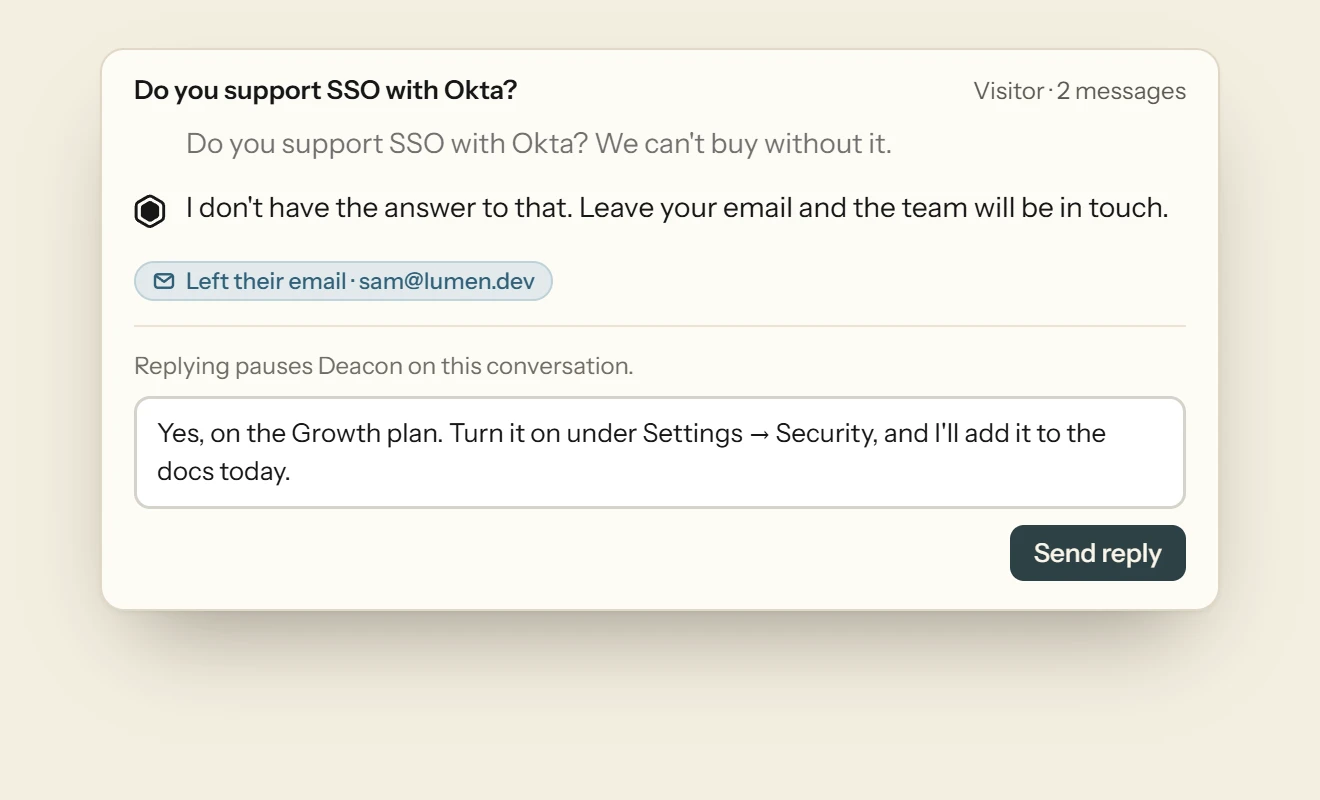
It keeps a list of what it couldn’t answer
Every conversation should be saved where you can read it. Deacon saves each one word for word, searchable by what customers asked, and tags each reply, such as Answered, Unanswered or Wants a person. The Unanswered filter lists the questions your content doesn’t cover yet, which is the list to work through each week.
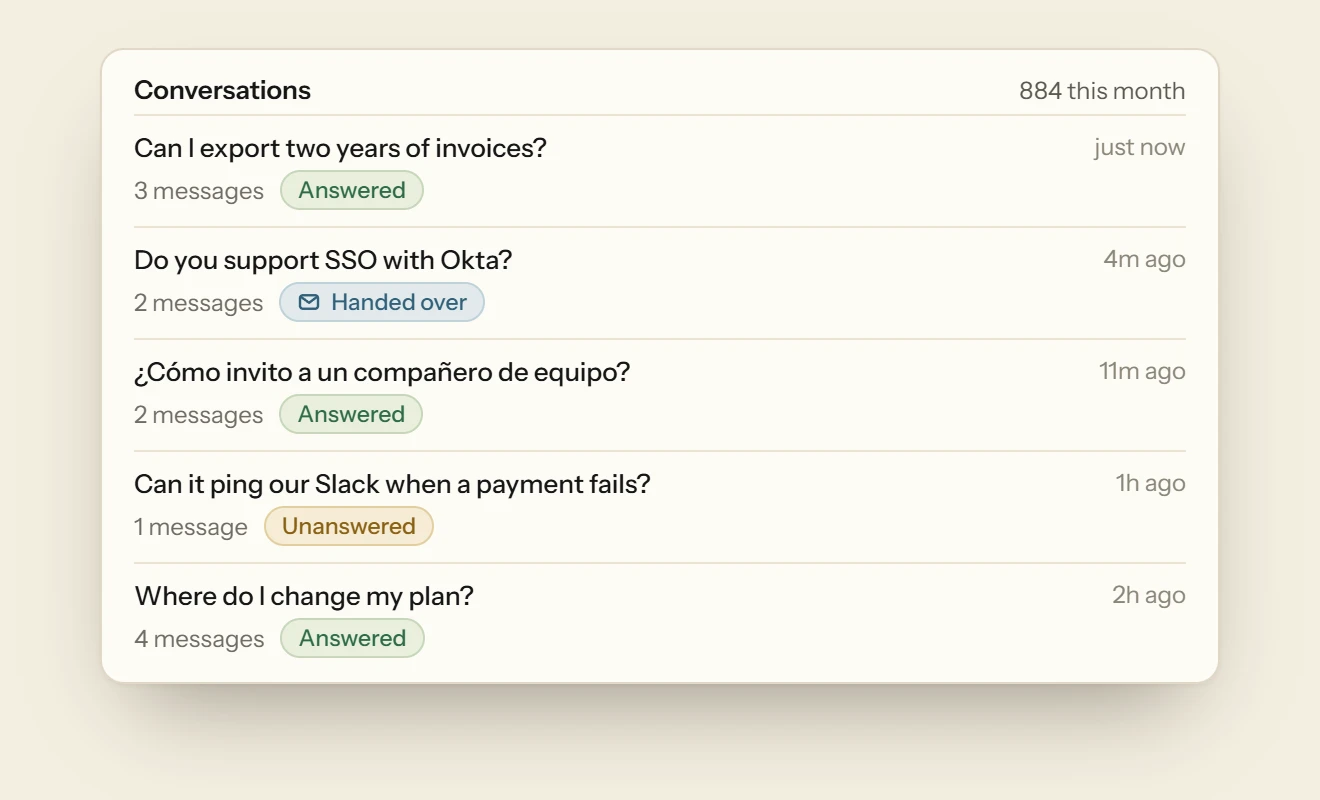
It lets you write each answer once
When you answer a question the chatbot missed, it should use your answer for the next customer who asks. In Deacon, a question your content didn’t cover has an Answer this button. Type your answer the way you’d reply, or as rough notes, and press Save. Deacon rewrites it as help content, adds it to your help document and answers the question again, so you can read the new reply at once. Similar open questions your answer also covers drop off the Unanswered list, so Deacon needs you less over time. FAQ chatbot shows the steps.
It reads what the customer shows it
A customer can often show a problem faster than they can describe it. Deacon reads a screenshot, a PDF, a Word file or a text file added to a message, and answers what the customer is showing it together with their words. It still states facts about your product only from your own content.
It shows you what customers ask
Your customers’ questions tell you which docs are missing and what to build next, once they’re grouped and counted. Deacon’s Topics group questions that mean the same thing, count the people who asked, and mark a topic as a bug report, a feature ask or a how-to when one kind of question leads it. Analytics › Widget lists what customers ask you to build, in their own words, and its What needs you list puts the people waiting for a reply first. Chatbot analytics shows the whole page.
Can ChatGPT be your support chatbot?
ChatGPT is a general AI assistant made by OpenAI, used in OpenAI’s own apps. A customer support chatbot needs four things that ChatGPT doesn’t give you as it comes. It needs a chat on your own site, answers drawn only from your docs, a way for customers to reach you, and a record of what they asked. You can build those around the same kind of model through OpenAI’s API, which is the third kind above, or use a chatbot that comes with them.
ChatGPT is one AI chatbot, and most AI customer support chatbots run on large language models of the same kind, from OpenAI, Anthropic, Google and others. The model writes each reply, and the product built around it finds the right passages in your docs, says when they run out and passes the customer to you.
How to set up a customer support chatbot
Setting up a customer support chatbot takes five steps, whichever one you pick. Deacon’s setup is the example here.
- List what customers ask. Go through last month’s emails and messages, write down the questions you answered more than once, and check each has an answer in your docs or on your site.
- Give the chatbot your content. With Deacon, you type your website’s address once, and it starts from your home page and the main pages customers ask about first, such as pricing, help and contact, ready to answer in about a minute. Files, pasted text and more pages can follow. How to set up an AI chatbot for documentation covers a docs site.
- Try it on a question your docs don’t cover. Deacon’s Try it plays questions a visitor is likely to ask, with its answers. Ask your own too, including one it can’t answer, and check it says so. The best AI chatbots for customer service lists five tests to run before you pay.
- Put it on your site. Deacon is one script tag, just before the closing
</body>tag. If your home page shows it was made in a builder such as Webflow, Framer, Wix, Squarespace, Shopify or WordPress, Install gives you that builder’s own steps. For a site you code yourself, it gives you one prompt for any AI tool, which a coding agent such as Claude Code or Cursor follows to put the tag in place and confirm Deacon shows on your site. How to add a chatbot to your website has the steps. - Work through the Unanswered list each week. Answer each question once, and the chatbot can answer the next customer who asks it.
What Deacon does for a founder who answers support
Deacon is built for a founder whose product has users and who still answers support, with no helpdesk and no support team. Beside the answers, it shows you what customers are stuck on and what they want you to build next, on every plan. On some tools that view sits on a higher plan. DocsBot keeps its conversation topic reports for Business, at $499 a month, and Chatling keeps the topic analysis in its advanced analytics for Growth, at $75 a month.
Every feature is on every plan, the free one included. Nothing is billed past a plan’s answers, no plan upgrades itself, every plan answers with the same model, and there’s no “powered by” line to pay to remove.
Questions about customer support chatbots
Is a customer service chatbot the same thing?
Yes. A customer service chatbot, a chatbot for customer service and a customer support chatbot all answer customers’ questions for a business, and the tools are the same. An AI chatbot for customer service is the AI kind described above, rather than a scripted one.
Which customer support chatbot is best?
The best one fits who answers your customers today. If a support team already works in a helpdesk, that helpdesk’s own AI agent, or Fin added to it, keeps everyone in one inbox. If you run a shop and want live chat beside the AI, Tidio pairs Lyro with its own chat inbox. If you answer support yourself with no helpdesk, Deacon is built for you. The best AI chatbots for customer service ranks nine for small teams, with prices.
How much does a customer support chatbot cost?
It depends on what the vendor counts. A helpdesk’s AI bills by the outcome, the resolution or the session on top of each agent’s seat, so the bill grows with your traffic as well as your team. A chatbot on its own usually sells a monthly plan with answers, conversations or credits. Chatbot pricing prices one month of 1,000 questions on eleven tools, and Deacon’s plans are on its pricing page.
Is there a free customer support chatbot?
Yes, several have free plans. Deacon’s needs no card and doesn’t expire. Tidio’s free plan doesn’t expire either, but its AI, Lyro, gets 50 conversations once, and they don’t renew. Intercom and Zendesk start you on 14-day trials, and HubSpot’s Customer Agent needs a paid Professional or Enterprise plan. Free AI chatbots for a website compares the free plans and their limits.
Will customers know it’s a bot?
They should, and Deacon says so in its first line. Its default greeting reads “Hi! I’m Deacon, [your company]’s AI assistant. How can I help you?”, and the box customers type in reads “Ask AI”. You can write your own greeting in Appearance, and Deacon translates it into the 41 languages the chat’s own words come in.
How do I cancel a chatbot subscription?
Each vendor cancels from its own billing settings, so check what happens to your chatbot and its conversations when the plan ends. In Deacon, Manage billing opens Stripe, where you cancel. A cancelled plan keeps working to the end of the period you paid for, and after that your team is back on the free plan’s limits.
What doesn’t Deacon do?
Deacon answers questions and hands conversations to you, and it takes no actions in other systems, so it won’t refund an order, change a plan or look up an account. It has no ticketing, no helpdesk integrations and no flow builder, and it answers only in the chat on your website, with no phone, WhatsApp, Instagram or SMS channel and no support inbox for email. Fin and HubSpot’s Customer Agent can act in systems you connect, and Fin, Freddy AI Agent and HubSpot’s agent also answer on WhatsApp. Your own code can act on what happens in a chat through Deacon’s webhooks and API, on every plan.
Try it on your own documentation
Add your help pages, ask it the question you know your docs cannot answer, and watch it say so.
The free plan covers 50 answers a month on one seat, and the paid plans are on the pricing page.
Free plan, no card.
READ NEXT
Best AI chatbots for customer service, with prices
The nine best AI chatbots for customer service, ranked for small teams, with prices read on 24 November 2026 and the plan where a person can take over a chat.
Chatbot vs live chat, and the option in between
What a chatbot and live chat each cost you in money and hours, where each one lets customers down, and the setup where AI answers first and you step in.
AI hallucination: what it is, with real examples
What an AI hallucination is, six real examples from Air Canada to Google, why chatbots make things up and how to make a support bot say it doesn’t know.