USE CASE
Adding a Webflow chatbot, and the plan it needs
Which Webflow plans let you add a chatbot’s script, what the AI chatbot apps in Webflow’s marketplace cost, and how Deacon carries a chat from page to page.
Webflow sites don’t come with a chatbot, so any Webflow chatbot is another company’s, added as an app from Webflow’s marketplace or as a script tag in your site’s Footer code. A script tag needs a Webflow plan that allows custom code, which the free plans don’t. We read Webflow’s help centre, its pricing and each chatbot’s pricing page on 23 September 2026, and tested webflow.com the same day.
Deacon is an AI customer support agent that goes onto Webflow as one line of Footer code. It answers your customers in seconds from your own pages, and the same line counts your visitors, so you learn what people ask as well as where they come from. The free plan gives you 50 answers a month, needs no card and has no end date.
What Webflow offers for chat, and what the chatbot apps cost
Webflow’s own chatbot integration page says Webflow sites include no live chat or AI chatbot of their own. Your choice is between an app from Webflow’s marketplace and a script tag you paste in yourself, and the two are closer than they look. Webflow’s developer documentation says an app adds its script to your site’s custom code, where you can see it in your settings, and that it goes live when you publish.
The marketplace has a Customer Support category. In Webflow’s popularity order on 23 September 2026, the first AI chatbot apps in it, after the live chat app LiveChat, were YourGPT Chatbot, Chat Whisperer and Orimon. Here’s what each gives you before you pay, from their own pricing pages that day.
| App | How it goes on | What’s free |
|---|---|---|
| YourGPT Chatbot | An app from Webflow’s marketplace | No free plan, only a trial. Essential is $39 a month billed yearly or $59 monthly, and the “Powered by YourGPT” line comes off on Advanced, at $349 a month billed yearly or $499 monthly. |
| Chat Whisperer | An app from Webflow’s marketplace | 50 messages a month for one chatbot, with no card. Starter is $29 a month for 200 messages. |
| Orimon | An app from Webflow’s marketplace | 50 credits a month, which Orimon says covers up to 150 messages. Its branding comes off on Elite, at $399 a month on monthly billing, or on Starter, at $49 a month, with a $20 monthly add-on. |
| Deacon | One line of Footer code | 50 answers a month from your own pages, with no card and no end date. Every feature is included, and there’s no badge to pay to remove. |
YourGPT Chatbot
- How it goes on
- An app from Webflow’s marketplace
- What’s free
- No free plan, only a trial. Essential is $39 a month billed yearly or $59 monthly, and the “Powered by YourGPT” line comes off on Advanced, at $349 a month billed yearly or $499 monthly.
Chat Whisperer
- How it goes on
- An app from Webflow’s marketplace
- What’s free
- 50 messages a month for one chatbot, with no card. Starter is $29 a month for 200 messages.
Orimon
- How it goes on
- An app from Webflow’s marketplace
- What’s free
- 50 credits a month, which Orimon says covers up to 150 messages. Its branding comes off on Elite, at $399 a month on monthly billing, or on Starter, at $49 a month, with a $20 monthly add-on.
Deacon
- How it goes on
- One line of Footer code
- What’s free
- 50 answers a month from your own pages, with no card and no end date. Every feature is included, and there’s no badge to pay to remove.
The allowances aren’t alike. YourGPT’s credits go 5 times as fast on GPT-4o as on GPT-3.5, its pricing page says. Chat Whisperer counts messages, and Orimon counts credits. Deacon counts answers, one per reply, and a conversation takes about 2 of them, so 50 answers covers about 25 conversations.
Where a chatbot’s script goes in Webflow
Webflow’s custom code guide, updated on 2 September 2026, lets a site-wide script go in Head code or Footer code, and suggests Footer code. Code there goes just before the closing </body> tag of every page, so the page’s content loads before the script runs.
- Open Site settings and choose the Custom code tab.
- Paste the tag into Footer code.
- Click Save changes.
- Publish. The tag does nothing on your live site until you do.
The plan custom code needs
The same guide says custom code needs a Core, Growth, Agency or Freelancer Workspace, or a Site plan on the site itself. On Webflow’s pricing page, the free Starter site plan has no custom code. The cheapest Site plan, Basic, is $15 a month billed yearly or $25 billed monthly, and it also lets you publish on your own domain.
Previews and your webflow.io address
Webflow’s preview runs custom code once a site manager switches on Run custom code in Preview, under Site settings › Custom code. The preview then renders on an address of its own, your site’s short name followed by .canvas.webflow.com, and Webflow’s note on previews warns that a script which checks the domain it runs on needs that address added to its list. The expanded canvas view in the Designer never runs custom code.
Every Webflow site can also publish to a free webflow.io address. That’s another domain again, so a chatbot that only runs where you allow it stays hidden there until you add it.
What survives a redesign
Footer code lives in Site settings, not in the design, so restyling or rebuilding pages in the Designer leaves it where it is. Code in one page’s settings, or in a Code Embed element, belongs to that page or element and goes when you delete it. A new site, such as one started from a fresh template, doesn’t have your tag in its settings, and it takes custom code only on a Site plan of its own or in a paid Workspace. Paste the tag in before you move your domain across.
Every link loads a new page
On 23 September 2026 we followed a link on webflow.com, which is built in Webflow, from its home page to its pricing page. The browser loaded the pricing page from scratch, and an element we had added to the home page was gone. So on a Webflow site a chatbot’s script starts again on every page, and it’s up to the chatbot to remember where the visitor was.
Deacon does. If a visitor has the chat open and follows a link, it opens again on the next page, at the same size and in the same place, with the conversation still in it.
What Deacon does on your Webflow site
Most of what visitors ask, your pages already say somewhere. Visitors don’t find it, so they ask you, and each repeat question pulls you away from building. Deacon answers them in seconds, day or night, from the pages you pick and in whatever language the customer writes in. When an answer comes from one of your pages, it often links to it.
If your pages don’t cover a question, Deacon says it doesn’t know instead of inventing an answer, and asks for the visitor’s email. When they leave it, or ask for a person, you get an email. You reply from Deacon’s dashboard, and your reply appears in their chat under your name. If they’ve closed it, a red count on the chat button tells them it’s there.
Then Deacon gets better. Each question your pages missed sits in the dashboard with an Answer this button, and what you write becomes part of what Deacon knows. It can answer the next person who asks, so the more you answer, the less it needs you.
You also hear from everyone who asks, not only the few who email. Every conversation is saved and searchable by what visitors asked. Topics groups similar questions, counts the people behind them and labels most of them, such as a bug report, a feature ask or a pricing question, so you can see what to fix and what to build next.
The same line of Footer code counts your Webflow site’s visitors on Analytics › Website, with where they came from, which pages they read, their country and device, your goals and your funnels.
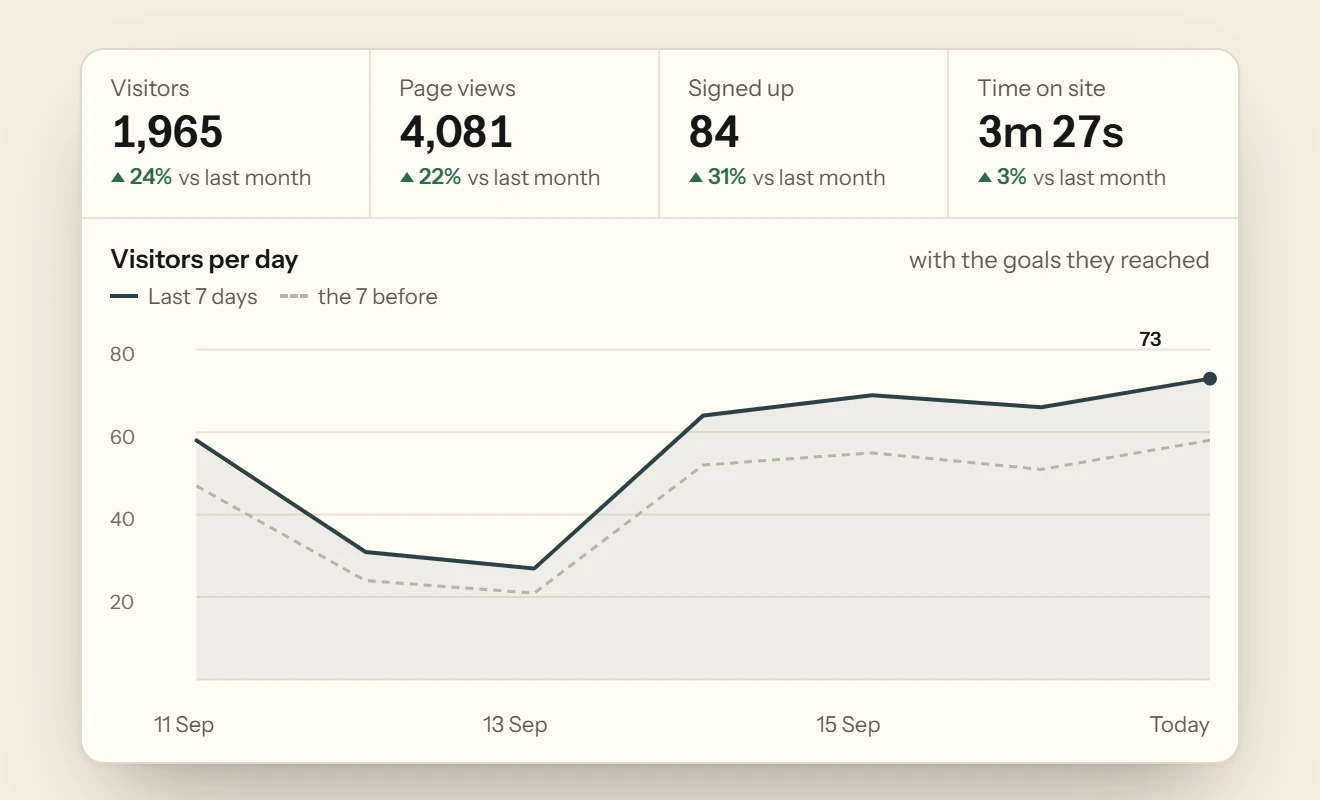
Every feature is on every plan, the free one included. There’s no badge to pay to remove, nothing is billed past your plan’s answers, and no plan upgrades itself. Every plan answers with the same model, so no credits run out faster on a better one. The pricing page has the paid plans.
Adding Deacon to Webflow
There’s no Deacon app to install. The snippet Deacon gives you looks like this, with your own key in place of the placeholder.
<script src="https://heydeacon.com/widget/v1/loader.js" data-key="pk_your_widget_key" async></script>
It takes a few minutes.
- Sign up with your email or Google, and give Deacon your site’s address. The free plan needs no card. Deacon chooses your home page and up to four main pages, such as pricing and help, learns from them by itself and can answer within a minute or so.
- On the Install page, check your site’s domain is listed, and add it if it isn’t. The website you gave when you signed up is already there, with your snippet ready, and it covers your address with or without www. Deacon shows only on the domains you list, so add your webflow.io address if you test there, and your canvas.webflow.com address if you want Deacon in previews. A question asked on either counts toward your answers, like one on your live site.
- In Webflow, paste the snippet into Site settings › Custom code › Footer code, click Save changes and publish.
- In Knowledge Sources, look over the pages Deacon chose, and untick any you don’t want it to use. On a paid plan you can crawl the whole site. If you use Webflow Localize, each page lists its translations in hreflang tags by default, so that crawl leaves secondary locales such as
/frout and says which it skipped. If you’ve switched those tags off, the locales are crawled and pointed out, so you can leave them unticked. - Ask it your customers’ questions in the Playground before anyone else sees it.
What to check after you publish
These five checks take a couple of minutes.
- Open your published site in a private window, so you see the new version rather than a cached one.
- Open the chat, ask something and follow a link. The chat should open again on the next page, with your question still in it.
- Look at the top of the Install page. It says whether Deacon is live on your site and when it was last seen, and it keeps checking by itself.
- Ask one question your pages answer and one they don’t. The first should get an answer, and the second an honest “I don’t know” with a box for an email address.
- If you tagged a button as a goal, click it on the live site and look for the goal on Analytics › Website.
Questions about Webflow chatbots
Does Webflow have a built-in chatbot?
No. Webflow’s own integration pages say its sites include no live chat or AI chatbot, so every Webflow chatbot is an app or a script from another company.
Which Webflow plan do I need to add a chatbot?
One that allows custom code. That’s any Site plan, from Basic at $15 a month billed yearly or $25 billed monthly, or a Core, Growth, Agency or Freelancer Workspace. A site on the free Starter plan in a free workspace can’t add a script.
Is there a Deacon app in the Webflow marketplace?
No, and you don’t need one. An app adds its script to your custom code, and Deacon’s line goes in the same place when you paste it into Footer code.
Why can’t I see my chatbot in Webflow’s preview?
Webflow runs custom code in preview and comment modes once Run custom code in Preview is on, and never in the expanded canvas view. Even then, the preview is on a canvas.webflow.com address, which a chatbot limited to your own domains won’t appear on until you allow it. Checking on your published site is simplest.
Can Deacon count sign-ups on my Webflow site?
Yes, without code. Select your sign-up button in the Designer, open the Element settings panel and add a custom attribute named data-deacon-goal, with the goal’s name, such as Sign up, as its value. The button works as before, and each click is counted as a goal on Analytics › Website.
Do I need Webflow Analyze as well?
Not for the basics. Webflow’s pricing page lists Analyze as an add-on, from $9 a month billed yearly or $12 monthly for 2,000 sessions a month. Deacon’s line of Footer code already counts your visitors, sources, goals and funnels on every Deacon plan, the free one included.
What happens when Deacon’s free answers run out?
A visitor who asks gets a short reply saying Deacon can’t look into that one right now, and is asked for an email unless they’ve already left one in that conversation. You can still read and reply to every conversation. Nothing is billed, and your plan doesn’t upgrade itself.
Try it on your own documentation
Add your help pages, ask it the question you know your docs cannot answer, and watch it say so.
The free plan covers 50 answers a month on one seat, and the paid plans are on the pricing page.
Free plan, no card.
READ NEXT
How to use Deacon
Install Deacon with one script tag, teach it your docs, make it look like your site and answer what it misses, step by step. Free plan, no card.
Framer chatbot plugins, or one line of Custom Code
The chatbot plugins in Framer’s Marketplace and what they cost, where a chatbot’s script goes in Custom Code, and what we found on live Framer sites.
How to add a chatbot to your website in 4 steps
How to add a chatbot to your website in four steps, where its script tag goes on each builder and framework, and how to tell it who’s logged in.