Website visitor tracking
Website visitor tracking counts the people who come to your site, where they came from, what they read and whether they signed up. Deacon does it for free, on every plan, with no limit on page views. You paste one script tag into your site and the counting starts with your next visitor. Deacon is an AI customer support agent for founders, and that same tag runs the chat that answers your customers in seconds. So one line of code shows you where visitors come from, ChatGPT and the other AI assistants included, and what they ask, and tagging your sign-up button shows which sources bring sign-ups. Some tools sold under the same name work out which company, or even which person, a visit came from and sell you that as a lead. Deacon counts visitors and never looks up which company or person a visit came from.
On every plan, including the free one.
At a glance
| What it counts | Visits, your main goal such as sign-ups, questions to the chat, the share who left after one page and time on site, over 7, 30 or 90 days against the period before, or all time. Under them are your pages, where visits start, sources, campaigns, JavaScript errors, countries, devices, browsers and systems. |
|---|---|
| Sources | Google is one row whatever the country, ChatGPT, Perplexity, Claude and the other AI assistants are one group, and social sites are another, each opening to its members. A visit counts towards the source it started from, not Stripe Checkout or the Google sign-in it came back from. |
| Free plan | Every part of the tracking is on it, with no limit on page views. It needs no card and has no end date. Paid plans add answers, knowledge, pages a month from your website and seats, never more tracking. |
| Tracking code | One script tag, pasted just before the closing body tag on every page. It loads in the background, and it’s the tag that runs Deacon’s chat, so there’s no second script. A single-page app is counted each time its path or query changes. |
| Goals and funnels | Tag a sign-up, or any moment that matters, with a line of code, an attribute or a class. A funnel puts two to five steps in order and counts the visitors who made them within one visit. |
| What it never does | It never identifies companies or people. Every figure on Analytics › Website is a count, and no visitor there has a name, a profile or a history you can open. |
| Cookies | A page view is counted without one, from a hash that changes every day. The script does set deacon_visitor_id as it loads, and keeps the same id in local storage, so Deacon can tell a returning visitor from a new one. |
| IP addresses | Website analytics stores none. The chat keeps its visitors’ addresses for 30 days. Do Not Track and Global Privacy Control aren’t read. |
| What it isn’t | A full analytics suite. There are no heatmaps, session recordings, filters, custom date ranges, exports, revenue figures or ad reports. |
How to track website visitors with Deacon
Add the code once, and everything it counts lives on one page of the dashboard, Analytics › Website, from your first visitor.
Paste the tracking code before the closing body tag
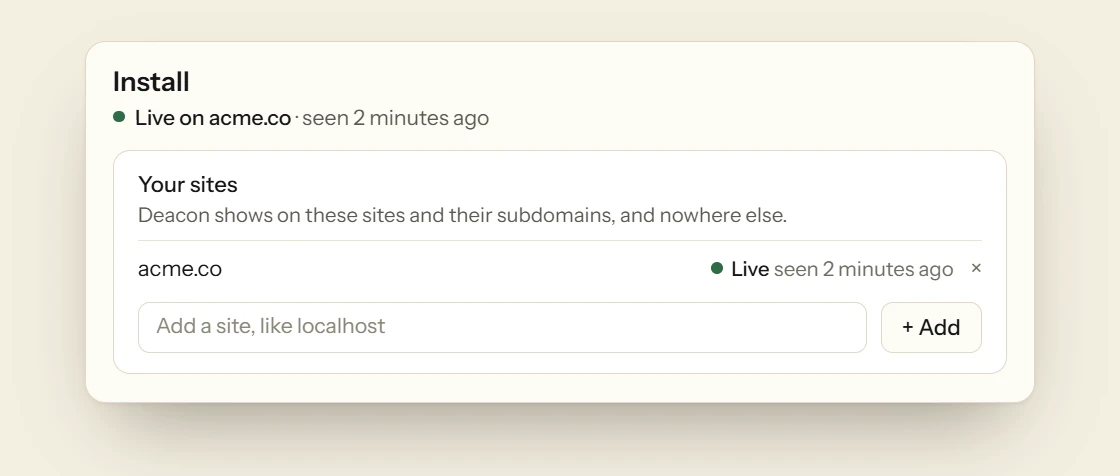
The site you give when you sign up is already on the Install page, so the code is ready when you get there. It’s one script tag, the same one that runs the chat widget. Paste it just before the closing body tag in the part of your site every page shares, such as Shopify’s theme.liquid, a header-and-footer plugin on WordPress, or the custom code in Webflow and Framer. Install opens on your builder’s own steps when your home page shows which one you used. On a site you coded yourself, copy the prompt for Claude Code, Cursor or Codex, which adds the tag and checks it’s live. A page view is counted when a page loads, when a page opened in a background tab is first looked at, and each time a single-page app moves to a new path or query. Development addresses such as localhost, automated browsers, bots and domains that aren’t on your list are never counted, so a copy of your snippet on someone else’s site adds nothing. The Install page tells you when Deacon has been seen live on your domain.
Who came, from where, and what they read
Up to five figures run across the top. They’re visits, your main goal such as sign-ups once your site sends one, questions to the chat, the share who left after one page and, once 10 visits have read two pages or more, time on site, each against the period before, and all time shows the totals alone. The chart draws any of them, or page views, a goal or a funnel, by day, week or month, with the same days of the period before as a dashed line. It splits visits by the sources that sent the most, and marks the day Deacon went live, a source’s first visits and an error’s first day. Your pages show their visits and the questions people asked the chat on each, and Where visits start shows the share that left from each page they landed on. Sources show the site that sent each visit, or the tag on the link, such as utm_source or ref, and a visit with no referrer reads Direct. Every country’s Google reads Google, and ChatGPT, Perplexity, Claude and the other AI assistants sit together in one group, as social sites do, each opening to its members. A visit counts towards the source it started from, so a customer coming back from Stripe Checkout isn’t a new source. A visitor from a Product Hunt listing reads producthunt, from the ref tag Product Hunt adds to its links, as the Product Hunt launch checklist explains. Countries, devices, browsers and systems sit under More detail. A visitor is counted once per UTC day, so someone who comes back tomorrow counts again, and a visit ends after 30 minutes with nothing happening.

Goals and funnels, named by you
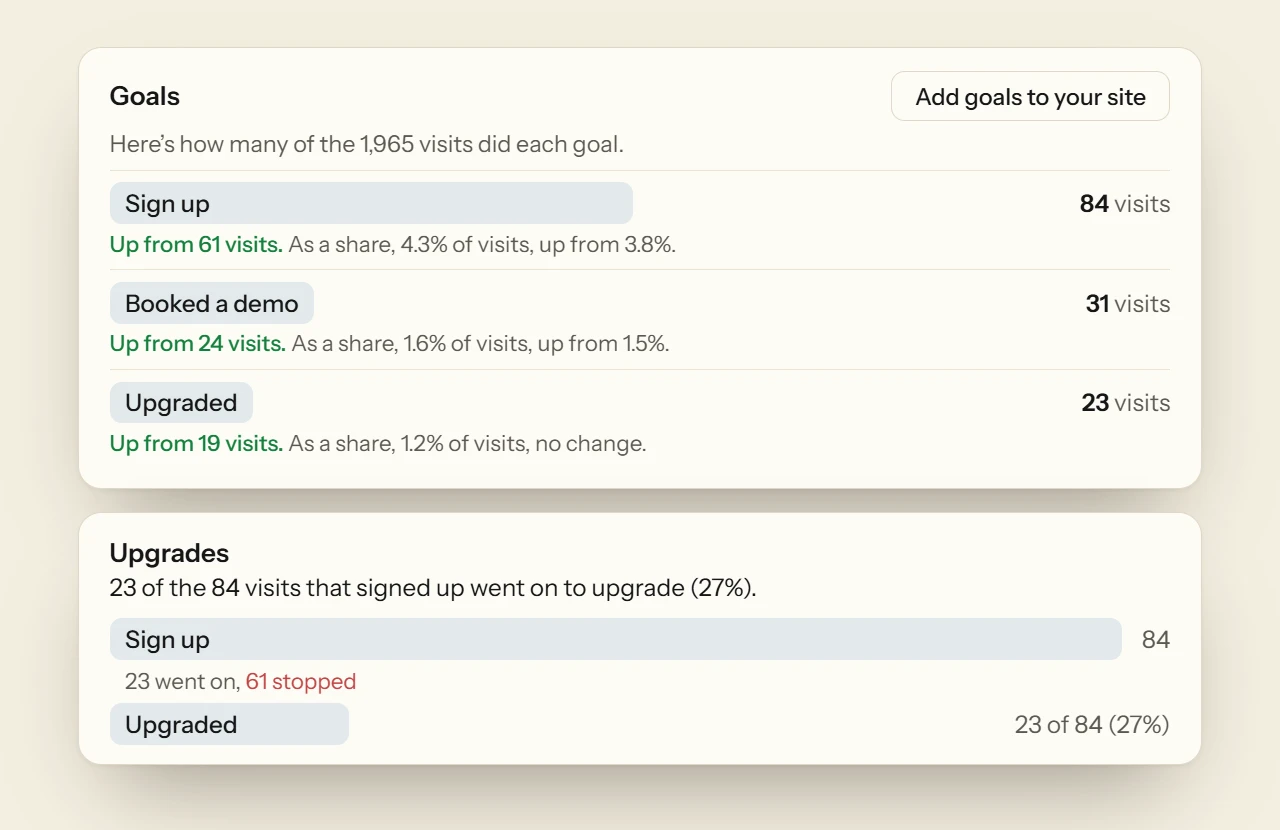
A goal is a moment you want visitors to reach, such as signing up or booking a demo. Send one from your code with Deacon.track('Sign up'), add data-deacon-goal="Sign up" to a button, a link or a form, or give an element the class deacon-goal--Sign+up in a site builder that only lets you set a class. A tagged link still goes where it was going. Name your goals in the dashboard and each one waits there for its first visitor, or hand the prompt beside them to Claude Code, Cursor or Codex, which tags them for you and checks that each one arrives. A goal sent from localhost shows as arrived and is never counted, so you can try it first. Put two to five steps in order and you have a funnel, counted within one visit, which can start from Visited, meaning any page.
What needs you, and what stood out
What needs you, the card under the chart, opens on the first job across your site and your chat, such as replying to the people waiting. Then it says how many bug reports visitors sent, how many visits your own code’s errors hit, how many questions are still waiting on you, and what to set up, such as a goal your site hasn’t sent yet or Deacon missing from your pages for two days. Your coding agent can read those errors too. The line under the chart names the source behind a day with more than three times your usual visits, or the figure that moved most. Each source is rated against one goal, which is Sign up if you have a goal by that name, else the end of your first funnel, else the first goal to arrive. Errors on your pages lists the JavaScript errors your own scripts throw, one row per bug however many times you deploy, with the visits each hit and the stack the browser sent. Once one has hit 30 visits, it also says what it cost a goal, when those visits did the goal less often than the rest. Each one copies for Claude Code or Cursor to fix, and Copy this page for your coding agent hands over the whole page. If nearly every visit arrives with no referrer and none starts on your home page, the page tells you the script is missing from some of your pages.

Visitor tracking is free, with no limit on page views
Add the script, tag your sign-up button, and see which sources send the visitors who sign up. You get 50 answers a month on the free plan, and it needs no card.
What website visitor tracking should count
These hold whichever tool does the counting, and none of them needs to know who anyone is.
Every page, not just the home page
A tracking script counts only the pages it loads on. Put it in the template every page shares rather than adding it page by page, or the pages you missed never appear in your figures.
People before page views
200 people reading 50 pages each and 5,000 people reading 2 each both make 10,000 page views. Read the visitor figure first, then the page views.
Where each visitor came from
A visit from a newsletter or a chat app often arrives with no referrer, and most tools file it under Direct. Add a tag such as utm_source=newsletter to every link you share, and the visit is filed under the name you gave it. Our free UTM builder adds the tags to a link for you.
One goal to judge every source by
Traffic alone tells you little. Pick the one thing you need visitors to do, usually signing up, and compare sources by the share of their visitors who do it. A source that sent 50 people and 6 sign-ups is doing more for you than one that sent 1,000 and none.
The page before the goal
When few people reach a goal, find the page most of them saw last. If half your visitors leave from the pricing page, that’s where to work.
The same days last time
A figure means little on its own. This week against last week tells you whether something changed, and then you can look for what you did that week.
Your own visits left out
Keep your own browsing out of the count, or a quiet week looks busy. Check that your tool skips localhost, and leave a signed-in app out page by page.
Nobody’s name
You can learn all of this without knowing who anyone is. Counting visitors doesn’t need names, email addresses or a profile for each person, and the less you collect, the less you have to explain in your privacy policy.
FAQ
Questions about website visitor tracking
Yes. Every feature is on the free plan, visitor tracking included, and no plan limits page views. The free plan needs no card and has no end date, and an account on it is only closed for inactivity after a year with no activity, with a warning first. A paid plan buys more answers, knowledge, pages a month from your website and seats for the chat, never more tracking. See the plans
Just before the closing body tag, on every page you want counted. Most sites have one template or footer that every page shares, so you paste it there once. A tag on the home page alone counts only the home page. Deacon’s tag carries async, so the browser keeps drawing your page while it loads.
No. Deacon counts only the sites its script runs on, and only on the domains you’ve listed. A traffic checker, such as the free version of Ahrefs’ checker, estimates the search traffic of any website, a rival’s included. Deacon’s figures are counts of the page views on your own site.
No. Deacon never looks up which company or person a visit came from. B2B tools such as Leadfeeder look up a visitor’s IP address in a database of company networks, and RB2B goes as far as named people for visitors in the US. Deacon turns the address into a hash that changes every day and never stores it with a page view, so there’s nothing to look up. The only names Deacon shows come from your own app. An app people log in to can tell Deacon who’s asking in the chat, so Conversations shows their name, and Analytics › Website still names nobody.
Counting a page view doesn’t. Each visitor is a hash of that day’s secret salt, your site, their IP address and their browser. The salt changes at midnight UTC and is deleted within 48 hours, so the count can’t follow anyone from one day to the next. The script itself does set a cookie, deacon_visitor_id, as it loads, before anyone opens the chat, and keeps the same id in local storage, so Deacon can tell a returning visitor from a new one. The cookie asks for 90 days, and Safari cuts a cookie set by a script to about 7. Once a visitor opens the chat, it also keeps deacon_chats in local storage, never as a cookie, so later pages know to check for your replies, and that lapses 30 days after they last opened the chat. If your app passes who’s logged in, it keeps that person’s id or email as deacon_signed_in in local storage, so the next person on a shared computer starts fresh. Within a tab, deacon_language and deacon_panel sit in session storage until it closes. Name each of them in your cookie policy.
No. Deacon shows no consent banner, has no consent setting and doesn’t read Do Not Track or Global Privacy Control. Its script sets its cookie as soon as it loads, so if your site asks visitors before setting cookies, treat Deacon’s script like any other script that sets one.
A visitor is counted once per UTC day, so the same person tomorrow is a second visitor. That’s what counting from a daily hash means. Nothing in the count follows a person from one day to the next.
For a small site that wants to know how many people came, from where and whether they signed up, yes. Google Analytics does far more, such as ecommerce revenue, audiences and links to Google Ads, and Deacon has none of those. The two don’t get in each other’s way, so you can run both and compare. Google Analytics alternatives compared For where Deacon fits next to the rest, see website analytics tools compared.
You can hide the chat button in the Appearance editor, and the counting carries on. There’s no analytics-only install, so the script still sets its cookie.
Add data-no-page-views to the script tag on that page, as you might across your signed-in app. Page views and JavaScript errors stop being sent from it, and goals are still sent, so a sign-up or an upgrade inside your app still counts.
From the first page view or goal in a visit to the last one, as the middle value of the visits that read two pages or more. A visit of one page lasted no time by that measure, so it’s left out of time on site and counted in the share who left after one page instead. A visit that reached a goal on its only page isn’t counted as leaving after one page.
See where your visitors come from
It takes about five minutes to install. The free plan is 50 answers a month, for as long as you like.