FAQ chatbot
Customers ask the same questions again and again, and an FAQ chatbot answers them in a chat on your site, so nobody has to search an FAQ page. Deacon is an AI customer support agent that does this for founders who handle support themselves. It replies in seconds from your docs and the answers you’ve written, and when neither covers a question, it tells the visitor so rather than guess. That question then waits in your dashboard for you, the human in the loop, to answer once. From then on Deacon can answer it for whoever asks next, and it needs you less with every answer you write. And each question it can’t answer points to a gap in your docs.
On every plan, including the free one.
At a glance
| What it does | Answers your customers’ most common questions, in a chat on your site, in whatever words they use and at any hour of the day. |
|---|---|
| Where answers come from | Your website, files and pasted text, plus the answers you write. When none of it covers a question, Deacon admits it and offers the visitor a field for their email. |
| Which questions to answer | The ones your visitors actually asked. Each question your content didn’t cover sits in Conversations with an Answer this button beside it. |
| Writing an answer | A few lines in the Answer this box, written as a reply or as rough notes. Press Save and Deacon puts it in your help document, where it answers as soon as it’s read in, with no retraining. |
| Proof that it worked | Deacon asks the visitor’s question again, with the conversation before it, and you read its reply under “Deacon now says”. |
| Other questions it covers | Deacon re-asks up to eight similar open questions and lists the ones your answer covers too. |
| What you learn | Where customers get stuck. Topics gather similar questions, show how many people asked and label most of them by kind, such as a how-to, a feature ask or a bug report. |
| Plans | Every plan, the free one included. Nothing you do in the Answer this box counts against your plan’s answers. |
How Deacon learns an answer it didn’t have
Okta appears nowhere in Acme’s docs, and here’s how Sam’s question becomes one Deacon answers on its own by Wednesday.
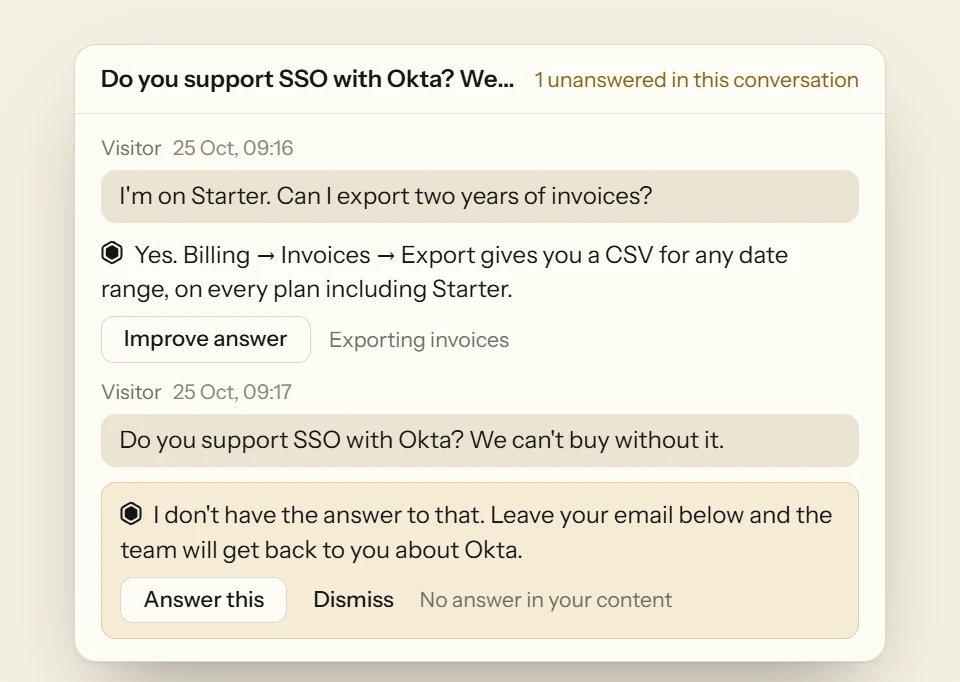
“Do you support SSO with Okta? We can’t buy without it.”
Tuesday, 09:14
A question nothing in your content answers
Sam’s team won’t buy without single sign-on through Okta, and Acme’s docs are silent on it. Rather than guess, and risk a yes that Acme can’t keep, Deacon admits it doesn’t know and asks Sam for an email address so the team can follow up. In your dashboard the question lands in Conversations, tagged Unanswered, with Answer this and Dismiss beneath it, and it joins the gaps left to answer that the top of the page counts.
Tuesday, 09:30
You answer it in a few lines
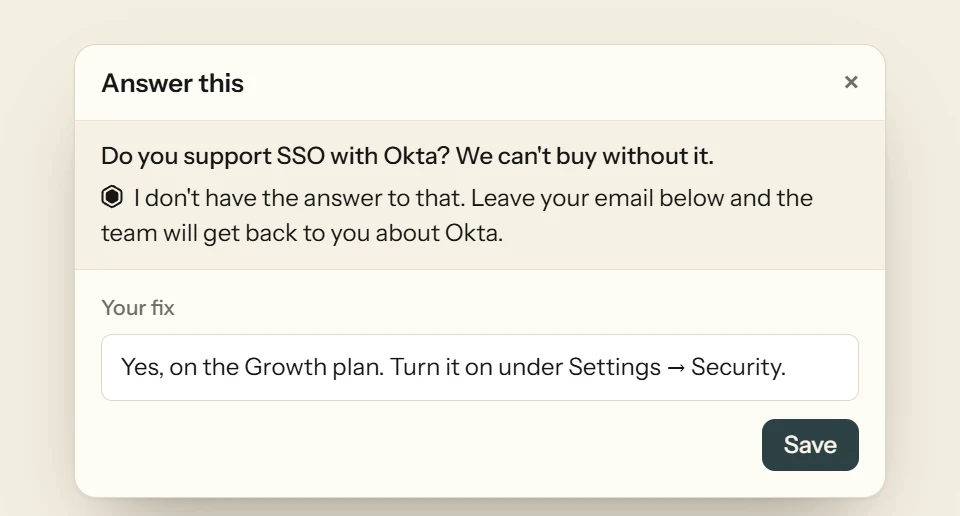
Press Answer this. The panel shows Sam’s question and what Deacon told Sam. Write what you’d tell Sam yourself, in a couple of sentences or as rough notes, and press Save. Deacon writes it up as help content, not as a reply to Sam. It goes into the section of your help document on that topic, or a new section named from what it says. A note about how Deacon should behave goes into your Instructions instead.
Tuesday, 09:31
Deacon asks itself the question and shows you its reply
The panel shows where your answer went and how that section now reads. There’s no preview to approve first. Move puts it somewhere else, and Undo puts everything back as it was. The section answers as soon as it’s read in, with no retraining. Then Deacon plays the visitor. It asks itself Sam’s question again, with the conversation before it, and you read its reply under “Deacon now says”. If it still can’t answer, it tells you. It also re-asks the open questions most like Sam’s, up to eight of them. “This also answered 3 other open questions,” it reports, and each one opens its own conversation. Those three leave your Unanswered list. None of this counts against your plan’s answers.

Wednesday, 10:05
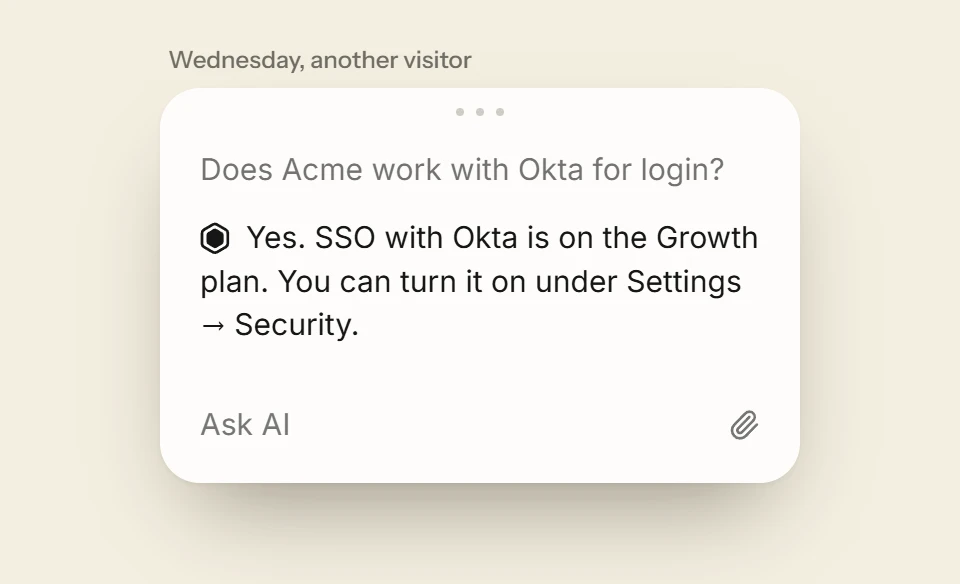
Wednesday’s visitor is answered without you
A different visitor asks, “Does Acme work with Okta for login?” It’s Sam’s question in other words, so Deacon matches it to your answer and replies in seconds, in the language that visitor wrote in. Nothing reaches your inbox, because there’s nothing left for you to do. That’s Deacon getting better. Every answer you write is a question that can stop landing on your desk, and Your answers at work on Analytics › Widget counts each question Deacon answers with what you wrote.
Fill your first gap before a customer finds it
Load a few pages of your docs, then use the Playground to ask Deacon something they don’t cover. The question turns up in Conversations with an Answer this button, ready for your first answer. You get 50 answers a month on the free plan, and it needs no card.
What to check before you choose an FAQ chatbot
Every FAQ chatbot demo looks good. These tests show how one will behave with your customers, whichever tool you’re trying.
Ask it a question your docs can’t answer
A good bot says it doesn’t know and offers a way to reach you. A bad one makes up an answer, and it will do the same in front of a customer.
Find out where missed questions go
Every bot misses questions. Check whether it keeps them where you’ll see them, and how many clicks it takes to add the answer.
Test a new answer in different words
After you add an answer, ask the question again the way a customer might, with none of your words in it. If the bot misses, your answer isn’t doing its job yet.
Count the setup before the first answer
Some bots need every question and every path through a conversation built by hand. Others start from the docs you already have. Know which you’re buying before you begin.
Work out what a busy month costs
Some tools bill per resolution or sell credits that run out, and some keep features for higher plans. Price a month of your real question volume on each plan you’re considering.
Make sure you can read every conversation
A bot speaks in your company’s name. You should be able to read everything it said, and search it by what customers asked.
Look for what the questions tell you
What people ask a bot is some of the best customer research you’ll get. Check whether the tool groups the questions and counts how many people asked each, or leaves you scrolling a log.
FAQ
FAQ chatbot questions, answered
No. Start with the website and files you already have, and Deacon answers what they cover from the first day. The questions they don’t cover collect in Conversations in your customers’ own words, and those are the FAQs worth writing. To get ahead of one, open your help document on the Knowledge Sources page, press Add section and give it a title and the answer.
An FAQ page is a list your customers have to search, in the order you chose and the words you used. An FAQ chatbot lets them simply ask, and replies in the chat in seconds. You don’t have to pick one. Add your FAQ page to Deacon as a link and it can answer from it as soon as it’s been read, while the page stays up for people who like to browse.
A rule-based bot follows paths someone built by hand, and it only recognises a question worded the way its builder expected. An AI FAQ chatbot like Deacon reads your content and understands the question however it’s put, so there’s nothing to map out first. The worry is that it invents things, which is why Deacon answers only from your content and says when it doesn’t know. Deacon vs ChatBot
Not letter for letter. When you save, Deacon writes your answer up as help content in your help document, and you see the section it went into as it now reads. You can edit it there whenever you like. Each reply is then written from it for the person asking, in their language, and “Deacon now says” shows you one straight away. No link appears under it, because a written answer has no page behind it.
Yes. Under any question Deacon answered, press Improve answer, write what it should have said and press Save. Your fix goes into your help document, and “Deacon now says” shows you the reply after your change. Deacon searches your help document like any other source and doesn’t put it first, so if a page says something different, correct that page too.
The panel tells you, and shows what Deacon replied instead. Your answer is found by searching, like any other source, so one that’s too broad may not come up for the question. Press Undo, narrow your answer to what was asked and save it again, or use Move to put it in a section that fits better. If another source says something different, correct that too.
Not its answers. Only the replies Deacon writes to visitors on your live site count. So Deacon asking a question again after you save is never counted, and nor are chats in the Playground. A written answer does count towards your plan’s knowledge, like any source, but a few paragraphs take up very little of it.
Deacon has a free plan with no card and no end date, and an account on it is only closed for inactivity after a year with no activity, with a warning first. Every feature is on it, Answer this and the help document included. The paid plans add more answers, knowledge, pages a month from your website and seats. See the plans
Paste one script tag before the closing </body> tag, or give Claude Code, Cursor or Codex the prompt from Deacon’s Install page, and it adds the tag and checks it’s live. That works on any site that lets you add a script, including WordPress, Shopify, Webflow and Framer, though Webflow needs a paid site plan for it and WordPress.com a plugin-enabled one. How to add a chatbot to your website
Stop typing the same answer twice
It takes about five minutes to install. The free plan is 50 answers a month, for as long as you like.