Chatbot analytics
Chatbot analytics is the record of what people ask your chatbot and how it answers them. The numbers worth reading are how many questions it answered, what people asked about and what went unanswered, and the list worth reading is who still needs you. Deacon is an AI customer support agent for founders who handle support themselves. It answers your customers in seconds from your own docs, and its analytics give you one line that says what to do first, such as replying to the people waiting. You hear from everyone who asks, not just the few who email, so you see what customers are stuck on and what they want you to build, in their own words. Each question it couldn’t answer is one you can answer once, and Deacon gets better the more you answer. You can try it all on the free plan.
On every plan, including the free one.
At a glance
| What it counts | Questions, not small talk. How many Deacon answered, how many people asked and how many conversations it handled without you, over 7, 30 or 90 days or all time. |
|---|---|
| What counts as answered | A question Deacon replied to from what it knows. Greetings, thanks, feedback and requests for a person aren’t questions, so they never pad the share. A question that hit an error or came after your plan’s answers ran out counts as not answered. |
| What needs you | One list, opening on the first job. People waiting for a reply, then bug reports beside your site’s JavaScript errors, then account and billing questions, then what Deacon didn’t know. |
| What people ask about | Topics group the questions one written answer would satisfy, in any wording or language, and count the people behind each. Most get a type, such as a feature ask, a bug report or a how-to. |
| What they want built | Feature asks in the visitor’s own words, a one-off ask included, with the asks about one thing gathered under their topic and the most asked first. |
| For your coding agent | Copy the whole page, a bug report or an error as Markdown for Claude Code, Cursor or any coding agent, in one click, or connect it and ask what broke. |
| What it couldn’t answer | The questions your content didn’t cover, each with an Answer this button in Conversations. Every answer you write there becomes part of what Deacon knows. |
| Every conversation | Saved word for word, with any files the visitor sent, the source each answer named, the page the visitor was on and, when your app passes it, who’s logged in. Search by what visitors asked, and filter by tag and date. |
| Plans | Every plan, including the free one. Chats in the Playground and on localhost are never counted. |
| What it doesn’t have | Ratings, thumbs up or down, satisfaction surveys, an export of these numbers, scheduled reports or a link to Google Analytics. Conversations can be saved as a CSV. |
What Deacon’s dashboard tells you
Analytics › Widget holds the numbers and the list of what needs you, Conversations holds every word, and each links to the other.
How Deacon is doing, in one sentence
Analytics › Widget opens on a sentence such as “Deacon answered 412 of 480 questions”, with the share it answered, how many people asked and the change on the period before. It counts questions, so a hello, a thank-you or a request for a person never pads the share, and the page tells you how many messages it left out. A question that hit an error, or came after your plan’s answers ran out, counts as not answered and gets a line of its own. Under it, Handled alone says how many conversations Deacon handled without you, and Your answers at work says how often Deacon used the answers you wrote. Once a range holds more than 150 questions, a chart of questions by day, or by week over longer ranges, marks when your knowledge changed and says what changed, so you can see whether a new page helped. Your own tests in the Playground and on localhost are never counted.

What needs you, in the order to do it
What needs you is the list to work down, and it opens on one line naming the first job, such as replying to the 3 people waiting. First come the people from the range you picked waiting for your reply whose email Deacon has, typed in the chat or from a sign-in your server verified, the newest three each with what they asked and a Reply link. Then come problems in your product, where bug reports from visitors sit beside the JavaScript errors your own pages threw, day by day. Then questions about accounts and billing, which need you because Deacon can’t look into anyone’s account, and then the questions Deacon didn’t know, each a click from writing the answer once. A bug report copies for Claude Code or Cursor in one click, in your visitors’ own words, and an error copies with the stack the browser sent. Copy this page for your coding agent hands over the whole page. When nothing needs you, it says so.
Topics show what people keep asking
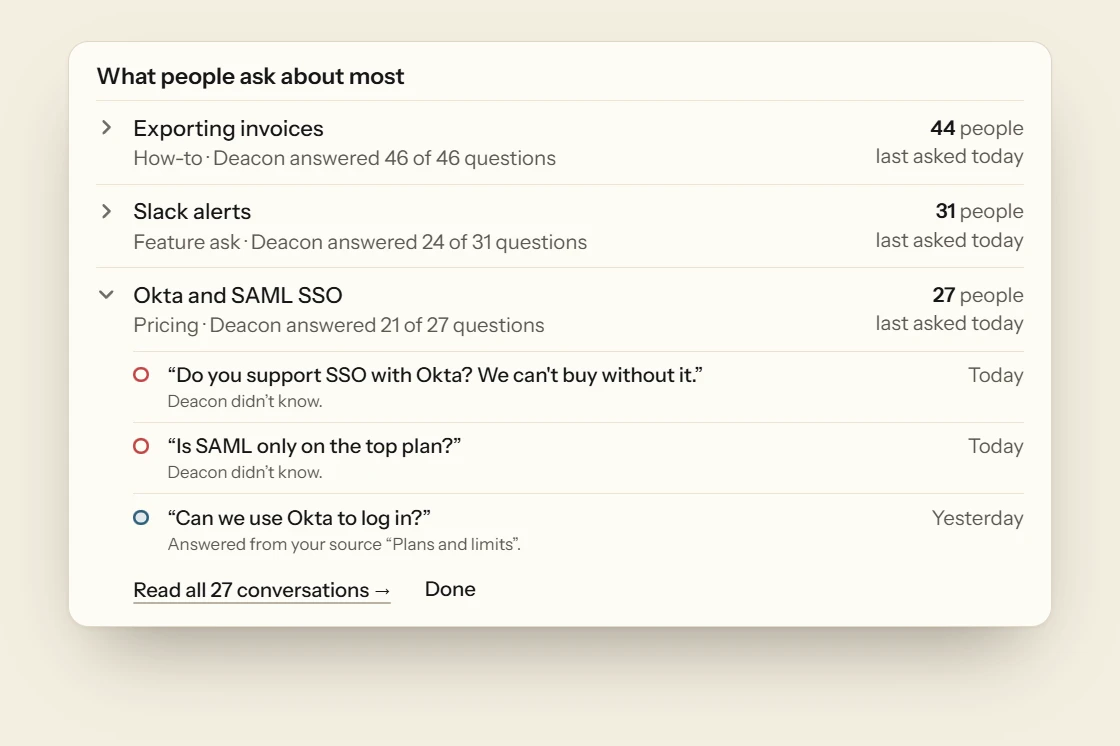
Deacon groups the questions one written answer would satisfy, whatever the wording and whatever the language, names each group in English and counts the people behind it. A topic is listed once two people have asked. Most get one of seven types, which are bug report, feature ask, how-to, pricing, account and billing, wants a person and feedback, and a tie gets none. Each topic shows a typical question in a visitor’s words, how many Deacon answered and the source it answered most from, and opens on its newest questions. Show all lists every topic by most people or most recent, with a filter for each type. Under them, What they ask you to build lists what visitors ask for in their own words, even an ask only one person made, so you see what customers want next before it becomes a topic. Mark a topic done and it comes back if more people ask.
Every conversation, tagged and searchable
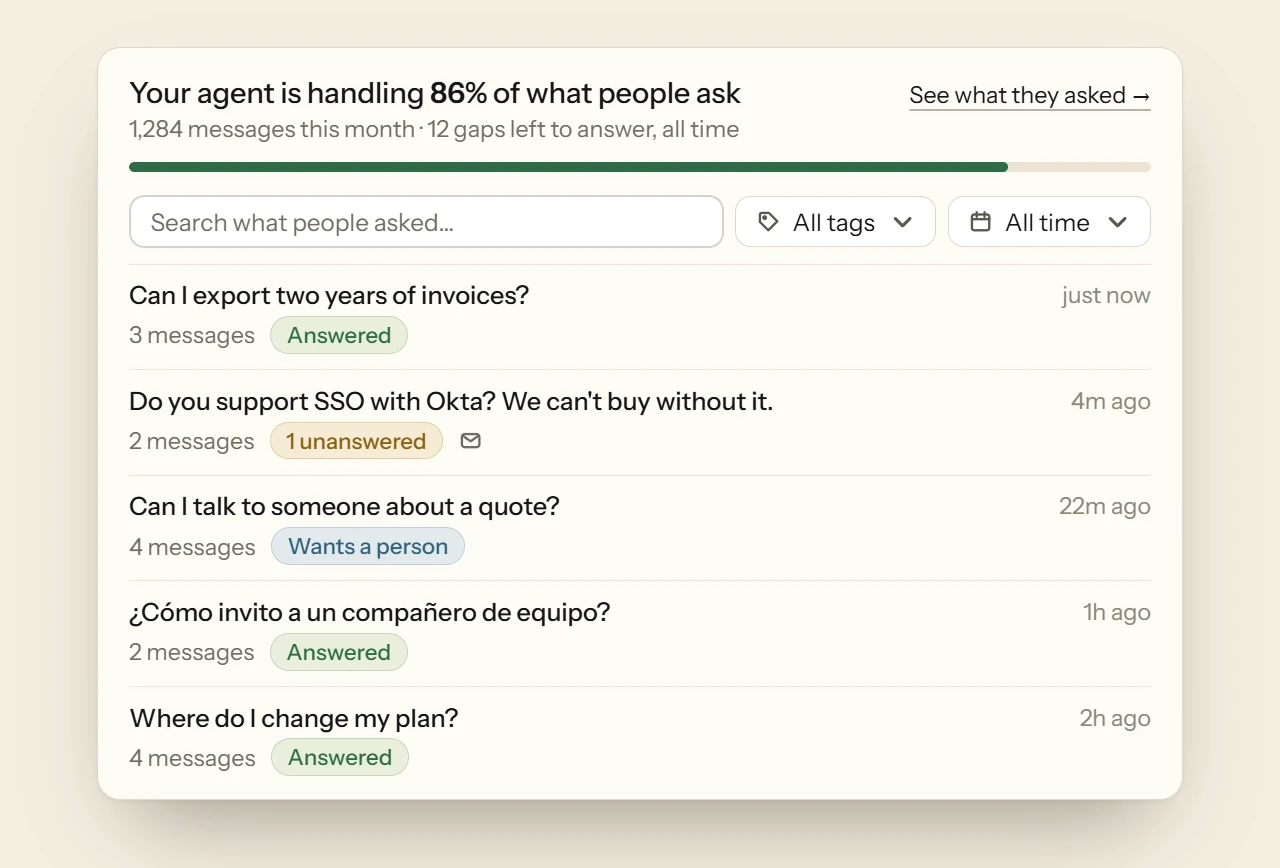
Conversations is the page you land on once you’re set up. Its top line gives the share of what people ask that your agent is handling, with this month’s messages and the gaps left to answer. The filter has a tag for each way a question can go, with a count beside it. They’re Unanswered, Wants a person, Failed, Over limit, Answered and Dismissed. Search looks through what visitors asked, never the replies, so you find a conversation by the customer’s own words. Dates narrow it to today, this week or this month, and the newest conversation is always first.
One conversation, and the answer it was missing
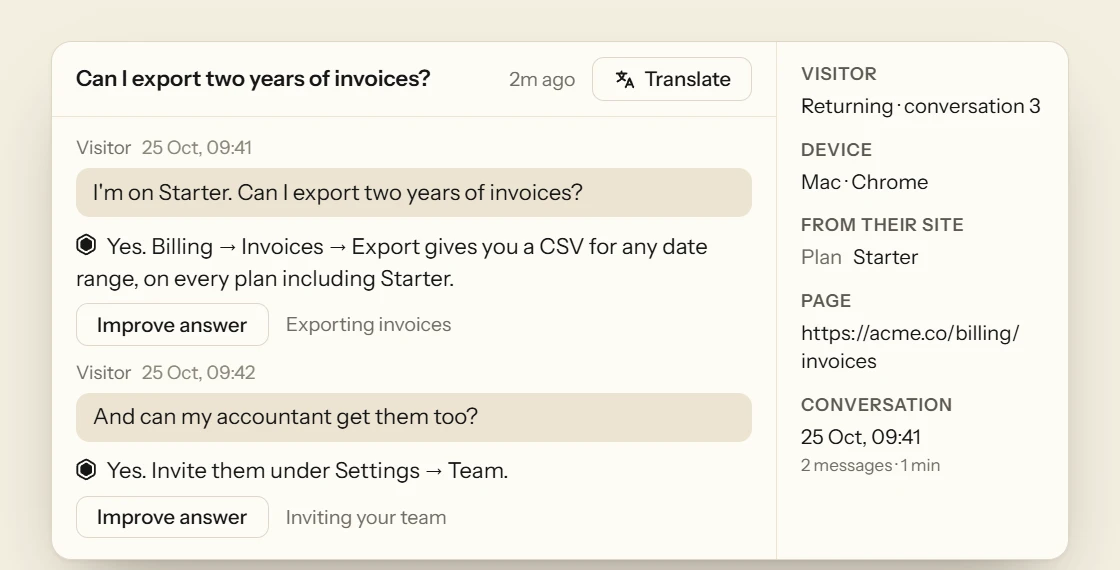
Open a conversation to read every turn, with any files the visitor sent, the source each answer named, the page the visitor was on, the topic each question joined and whether they’ve chatted before. The name and email of whoever is logged in sit beside it under Logged in as, when your app passes them, with a tick when your server verified who they are, and anything else it passed, such as their plan. Translate puts the whole conversation into your browser’s language. A question your content didn’t cover has an Answer this button. Write the answer once, even as rough notes, and press Save. Deacon puts it in your help document, asks itself the question again and shows you what it now says. It also lists the other open questions your answer covers, each opening its own conversation, and they come off your Unanswered list. From then on it can answer the next person who asks, the gaps left to answer go down, and Deacon needs you a little less.
See what your customers ask this week
Install Deacon and the counting starts with its first conversation, with no report to build and nothing to switch on. You get 50 answers a month on the free plan, and it needs no card.
What to read in your chatbot analytics
These hold for any chatbot, whichever tool you use. Start at the top.
The questions it couldn’t answer
This list is worth more than any percentage. Each question on it is either missing from your docs or something customers want that you don’t offer yet. Work through it every week, starting with the one most people asked.
What your answered share counts
Tools name it differently, from the resolution rate to the containment rate, and they count it differently too. Some count a greeting, or a visitor who gave up, as a success. Find out what yours counts before you compare it with anyone else’s.
People, not just messages
One stuck customer can send a dozen messages. Read the number of people beside the number of messages, or one bad afternoon looks like a busy month.
What people ask about
Group the questions by what they’re about and count the people behind each group. That tells you what to fix in the product and what to write in the docs. If 30 people ask how to export invoices, a page is missing. If 30 ask for an integration you don’t have, it belongs in your planning. Those questions are the part of the voice of the customer that arrives without a survey. Customer insights goes through what each kind of question points to.
Where people ask from
The page a question comes from shows you where people get stuck. Lots of questions from your pricing page mean the page isn’t clear, however good your docs are.
Handoffs to a person
The escalation rate is the share of conversations passed to a person. It matters most when one question is behind most of the handoffs, because you can write that answer down once.
Deflection, with care
The deflection rate counts the questions that never reached your team. A visitor who closed the chat in frustration never reached you either, so read real conversations alongside it.
A few conversations every week
Numbers tell you where to look, and conversations tell you what happened. Reading 10 a week is enough to catch a wrong answer, a missing page or a tone you don’t like.
FAQ
Questions about chatbot analytics
Start with the questions it couldn’t answer, because each one is either missing from your docs or something your customers want that you don’t offer. Then read the share answered, what people ask about, and how many people asked as well as how many questions. Deacon shows all of them from its first conversation.
A question Deacon replied to from what it knows, instead of declining. Greetings, thanks, feedback and requests for a person aren’t questions, so they’re left out of the count, and the page says how many it left out. A reply saying it doesn’t know counts as not answered, and so do the short fixed reply sent when nothing in your content matched, a question that hit an error and one that came after your month’s answers ran out. The share shows once there are 20 questions. Answered doesn’t mean the reply was right, so read some conversations too.
Not for questions already asked. Each figure records what the visitor got at the time, so last week’s share stays as it was. What goes down is the list of questions still unanswered in What needs you, the next person who asks gets your answer, and Your answers at work counts each time Deacon uses it.
It counts people waiting for your reply whose email Deacon has, typed in the chat or from a sign-in your server verified. Waiting means nobody on your team has replied since. What needs you puts the ones from the range you picked first, with the newest three ready to reply to. While any of them is waiting, it adds a line for anyone still waiting from before and links to all of them in Conversations. A visitor who asked for a person with no email on file isn’t counted there, and Conversations tags their chat Wants a person.
No. There’s no rating, no thumbs up or down and no survey after a chat. In their place you have the share answered, the list of what went unanswered and every conversation to read.
It compares each new question with the ones nearest to it in meaning, and a model judges whether each pair is the same question, meaning one written answer would satisfy both people. So a question in Spanish can join a topic that started in English. It joins a topic only when that topic’s own example question is judged the same too, so a loose match can’t drag in a different question. A topic is listed once two people have asked, and its name is in English.
Yes. Each conversation shows the page the visitor was on, and on Analytics › Website each of your pages shows how many questions were asked there and how many weren’t answered. Once a page has had enough questions, and they go unanswered clearly more often than anywhere else, What needs you on Analytics › Widget names it as the page where people get stuck. Deacon doesn’t use the page to answer, only to show you where people get stuck.
Not as a file. You can export your chats from Conversations, but not these numbers, and there’s no link to Google Analytics and no weekly email. Copy this page for your coding agent puts the whole page on your clipboard as Markdown, starting with what needs you, so you can paste it into Claude Code, Cursor or a doc. Your website’s visitors, sources and goals are counted by the same script and sit under Analytics › Website.
Not the ones in the Playground or on localhost. Playground chats show in Conversations marked as asked from the Playground and are never counted, in the analytics or against your plan’s answers. A chat you start on your live site counts like any visitor’s.
Yes. Every number, topic and conversation is on every plan, the free one included, and nothing here is kept for a paid plan. The plans differ only in answers, knowledge, pages a month from your website and seats. See the plans
Find out what your customers ask
It takes about five minutes to install. The free plan is 50 answers a month, for as long as you like.