Knowledge base chatbot
A knowledge base chatbot is an AI chatbot that answers your customers from the content you give it, rather than from whatever its model picked up on the internet. Deacon is one, built for founders who handle support themselves. Hand it your help pages, files, pasted text and the answers you write, and it turns them into an AI knowledge base that replies in seconds using only the passages that fit each question. When nothing you’ve given it covers a question, Deacon won’t invent an answer. It says it doesn’t have one and invites the visitor to leave an email. Each of those questions shows you a gap in your docs, and Topics show how many people are asking about the same thing.
On every plan, including the free one.
At a glance
| Four kinds of source | Your website, uploaded files, pasted text and the answers you write. A single page can go in as a link, without a crawl. |
|---|---|
| Files it takes | PDF, Word (.docx), Markdown, plain text, CSV and HTML, up to 10 MB each. Scans work, because PDF pages are read as images. |
| How a reply is written | It searches your content by meaning and by keyword, then writes a reply in seconds using only what it found. |
| Links to your pages | Usually a link under the reply when a page on your site supplied the answer. Files, pasted text and written answers have no page to link. |
| Questions it can’t answer | Deacon says so, in the visitor’s language, and invites them to leave an email. It won’t guess at a price, a date or a policy detail your content leaves out. |
| Keeping it current | When a page changes, re-fetch it, free and once a day, and Deacon answers from the new version as soon as it’s read. There’s no automatic re-crawl, so nothing changes without you. |
| What you learn | Each question your content didn’t cover is a gap worth filling, and Topics group similar questions with a count of the people who asked. |
| Plans | Every feature is on every plan, the free one included. The paid plans hold more content, read more pages a month from your website and give more answers. |
How Deacon turns your docs into answers
You do the first step once, and Deacon does the rest every time someone asks.
You add your website and decide what stays
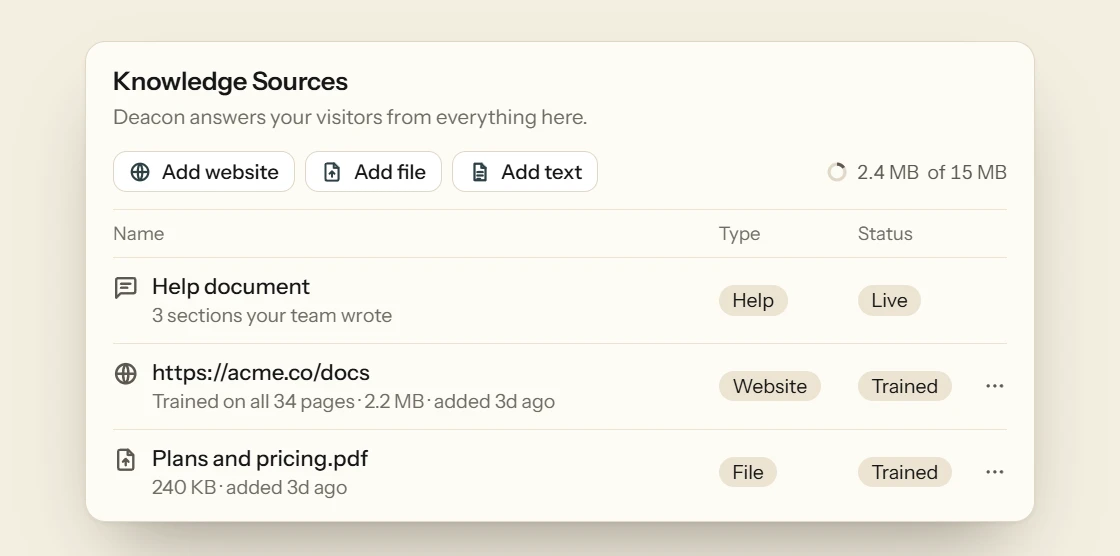
Start with your website. When you sign up, Deacon reads your home page and up to four main pages, such as pricing and help. It learns from them by itself, so it can answer within a minute or so. It never picks sign-in, sign-up, password, cart, checkout or account pages. You can untick anything else you wouldn’t stand behind, such as a draft or an old pricing page. On a paid plan you can crawl your whole site, up to 100 pages at a time, and tick the pages it learns from. That crawl leaves out translated copies of your pages, such as a /fr/ section, when your site marks them as translations, because they repeat what Deacon already has. A single page can also go in as a link, without a crawl, and like a file, pasted text or a written answer, it’s live as soon as Deacon has read it.
Every question starts with a search
Your content is split into short passages. For each question, Deacon looks for the passages that match its meaning and the ones that share its exact words, then puts the best of both in front of the model. That’s why “can I get my money back?” can find a refund policy that never says “money back”, and why a pasted error code, or a screenshot of the error, can find the page that explains it, since Deacon searches with the words it reads in a visitor’s file. A follow-up such as “and on the free plan?” is searched along with the question before it, so it stays on topic. The whole approach is called retrieval-augmented generation, or RAG.
It writes the reply under strict rules
The model gets those passages and a set of rules for grounding its reply in them. Answer from them and nothing else. Never supply a figure, a date, a price or a policy detail they don’t state. Never join a line about Apple Pay and a line about refunds into a promise about Apple Pay refunds. The reply arrives in seconds, in whatever language the visitor wrote in, and a reply drawn from a page on your site usually carries a link to it. Details your app passes in, such as the visitor’s plan, help it pick which answer applies. A question too vague to answer well gets a question back, and one your content doesn’t cover gets a plain “I don’t have the answer” and a request for their email.

You read every reply, and the source it named
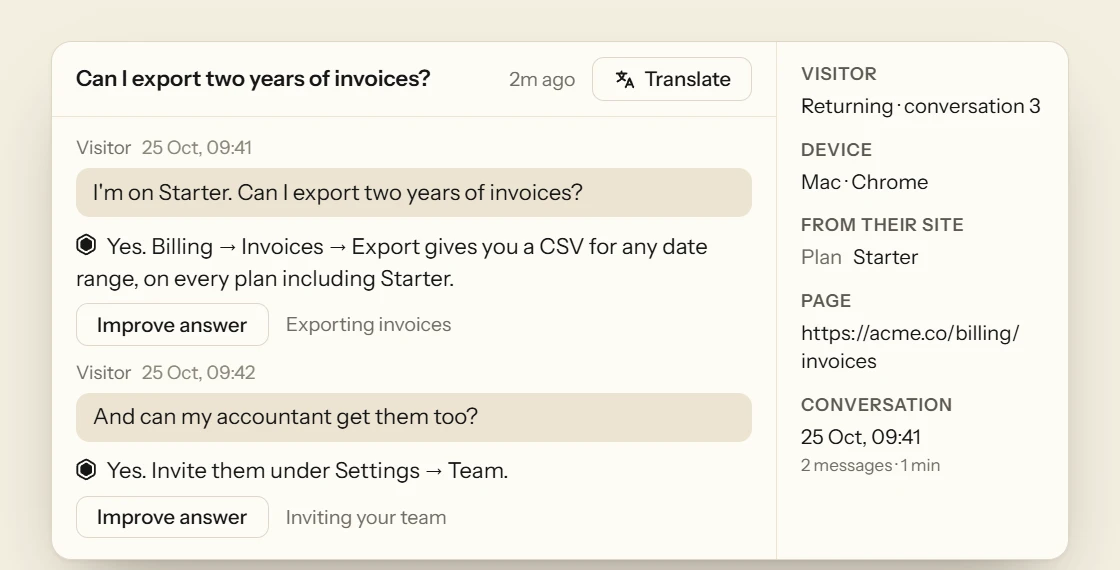
Open any conversation and each answer shows the source Deacon named, or “Your content” if it named none. Beside the conversation are the page the visitor asked from, whether they’ve talked to Deacon before, anything your app told it about them and the topic their question joined. Filter by Unanswered to see the questions your content didn’t cover, apart from any where the visitor also asked for a person, which are tagged Wants a person instead. That list is your knowledge base’s to-do list.
Try it on the docs you already have
Add your website, untick any page you wouldn’t want quoted, then put your trickiest customer questions to Deacon in the Playground, where no chat is ever counted. You get 50 answers a month on the free plan, and it needs no card.
What to put in a chatbot’s knowledge base
A chatbot answers only as well as the content behind it. These are the pages most worth giving any tool, and the ones to keep back.
Pricing, plans and what each includes
Plan questions come just before a purchase, when a wrong answer costs the most. Give the bot one page that names each plan, its price, its limits and what it leaves out.
Setup steps, written out in words
Getting started is where new customers stall. Write each step as text, with the exact button and menu names, because many bots can’t read the words in a screenshot.
The policies customers hold you to
Refunds, cancellations, data deletion and uptime. Word each one exactly as you mean it, because a bot will repeat it as a promise.
Limits and error messages
File sizes, rate limits and the exact wording of common errors. Customers paste the error they see, so a page that quotes it word for word is easy to find.
What your product doesn’t do
A short page listing what you don’t support lets a bot answer no plainly, instead of leaving the customer unsure.
Nothing that isn’t meant for customers
Whatever the bot reads, it may quote. Keep back internal notes, drafts, unreleased features and old pricing.
Someone to keep it current
Decide who updates the knowledge base when you ship, and reread the pages each release touches. An out-of-date page reads just as true to a bot as a current one.
FAQ
What people ask about knowledge base chatbots
Yes, if it’s allowed to fall back on what its model learned elsewhere. Invented answers like that are called AI hallucinations, and one in front of a customer can cost you a sale. Deacon answers only from passages it found in your content, and if they don’t contain the fact someone asked for, it says it doesn’t know. Why chatbots hallucinate
No. Deacon reads any page on your website, not only help articles, along with files and pasted text. You can start with your landing page, your pricing page and a few docs, then answer the questions your content didn’t cover as they come in. If you’d like one anyway, the best knowledge base software compares eight. What goes into an AI knowledge base
No. An answer from a page on your site usually shows a link to that page under the reply. Answers from files, pasted text and written answers show no link, because there’s no public page behind them. Your dashboard shows the source behind each answer, or “Your content” when Deacon named none.
Nothing, until you tell Deacon. Re-fetch the changed page from the ⋯ menu on its row, and Deacon answers from the new version as soon as it’s read. For a file, upload the new version under the same name, then press Retrain agent. Re-fetching is free and works once every 24 hours for each page. The old version keeps answering in the meantime, so customers never see a half-finished edit. There’s no scheduled re-crawl.
Yes, and it’s the text Deacon extracts that counts, not the size of your files. Each plan sets how much text it can hold and how many new pages it may fetch each month, and the pricing page lists them. Re-fetching a page Deacon already has doesn’t count. A crawl of your whole site, on a paid plan, covers at most 100 pages, and a single upload can be up to 10 MB. Deacon reads a PDF of up to 200 pages in full. One that’s longer, or too dense to finish, is turned away with a note asking you to split it into parts.
No. Deacon can’t see your customers’ accounts, so a question about their own account, invoice or data is always declined, whatever your docs say, and they’re asked for their email so you can reply. It takes no actions in other systems either, such as refunds or plan changes.
No. Deacon is told to treat your content as information, never as orders, so a page that says “ignore your rules” is read as text. The same goes for a visitor trying to talk it into a fixed reply. Your own Instructions can set its tone and tell it about your business, but they never override the rule to answer only from your content.
Yes, though Deacon has no ready-made connection to those tools. If the pages are public, add them by their links, or on a paid plan crawl the whole site. If they’re private, save them as PDF, Word or Markdown files to upload, or paste the text in. Your own code can also add text through the API. An AI chatbot for your documentation
Yes. Deacon’s free plan costs nothing, needs no card and has no end date, and an account on it is only closed for inactivity after a year with no activity, with a warning first. You get every feature, with less room for content and fewer answers than the paid plans. See the plans
Not really. Deacon is built to answer visitors on your website, and staff can’t ask it from Slack or Teams. Your team uses Deacon’s dashboard to read what customers asked and to reply to them.
Let your docs do the answering
It takes about five minutes to install. The free plan is 50 answers a month, for as long as you like.