Human handoff
Human handoff is the moment a chatbot stops answering and passes the conversation to a person. Deacon is an AI customer support agent for founders who are their own support team. It answers your customers in seconds, from your own docs. When the docs don’t cover a question, it says so instead of guessing and asks for the visitor’s email. You get an email when they leave it or ask for a person. Reply from Deacon’s dashboard and your words appear in their chat, with no helpdesk to set up. And every question it hands you shows you what customers are stuck on.
On every plan, including the free one.
At a glance
| When Deacon hands over | When your content doesn’t cover the question, when it’s about the visitor’s own account or invoice, when they ask for a person, and when 3 clarifying questions haven’t got them an answer. Until you reply, Deacon keeps answering their other questions. What still needs a person in support |
|---|---|
| What the visitor sees | Deacon saying plainly that it doesn’t know, in their own language, and a field for their email address. If your app passes Deacon the name and email of a customer who’s logged in, their address is already in that field, ready to send with one tap. A visitor who asks for a person hears that you’ve been told and will reply right there in the chat. |
| How you hear about it | The owners on your team get an email 3 minutes after a visitor leaves an address or asks for a person. If one of you has the dashboard open, a toast or the unread badge says it there instead. |
| Where you reply | In the conversation, from Deacon’s dashboard. A visitor with the chat still open sees your reply there. One who has gone sees a red count on the chat button, and your reply next time they open the chat in that browser. It’s emailed too if they left an address and haven’t read it in the chat. |
| When Deacon takes over again | When you press Hand back to Deacon. A conversation you’ve taken over also closes after three quiet days, and the visitor’s next question starts a new one that Deacon answers. |
| What you learn | The questions your content didn’t cover wait in Conversations, each with a box for your answer, and Topics count how many people asked the same thing. You see which gaps in your docs matter most. |
| Plans | Every plan, including the free one. Your replies, and the visitor’s messages to you, never count towards your plan’s answers. |
| How often it happens | The share of conversations handed to a person is the escalation rate, which some tools call the human handoff rate. How to work out the escalation rate |
A handoff in Deacon, minute by minute
Sam is ready to buy, but only if you support one thing your docs never mention. Here’s how the next 12 minutes go.
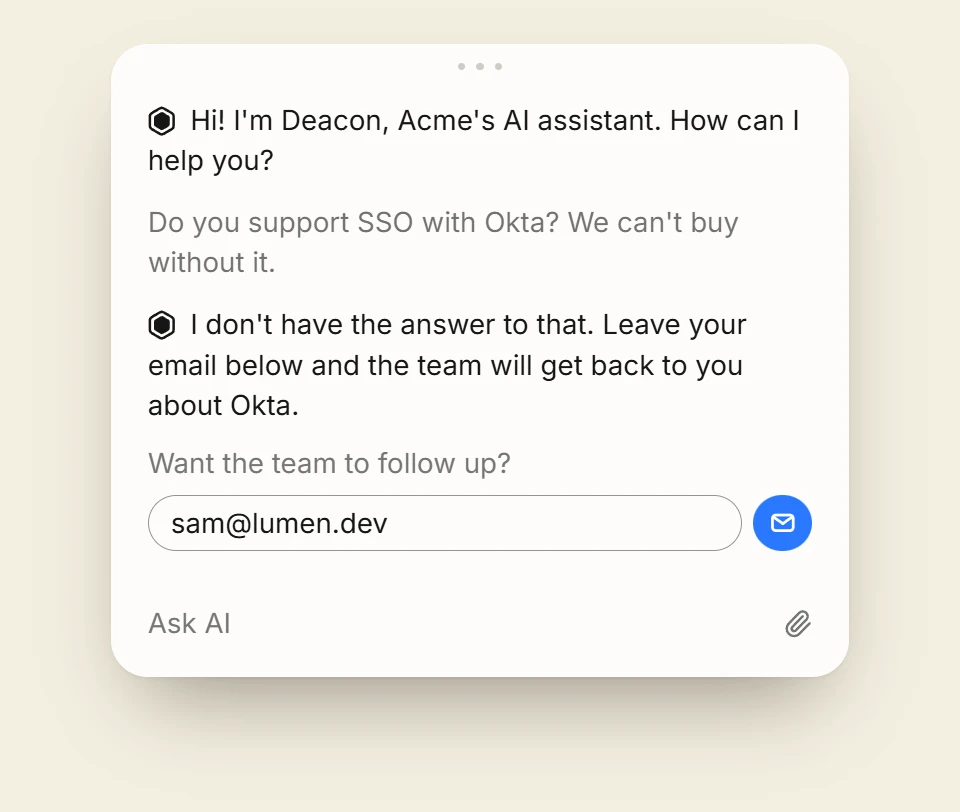
“Do you support SSO with Okta? We can’t buy without it.”
Tuesday, 09:14
Deacon says it doesn’t know, and asks for an email
Your docs never mention Okta. A bot that guessed could promise Sam something you don’t offer, or lose you the sale with a wrong no. Deacon says plainly that it doesn’t have the answer, in Sam’s language, and shows a field for an email address. Sam is a prospect, so Sam types it in. A customer logged in to your app would find their own address already there, if your app passes Deacon their name and email. A visitor who asks for a person gets the same field, and Deacon tells them you’ve been told and will reply right there in the chat. If Sam had been describing a problem for a while, Deacon would sum it up for you in one sentence. And if your reply will obviously need one more detail, such as the exact error message, it asks for that once and passes it on, and Sam could paste a screenshot of it rather than type it out.
Tuesday, 09:17
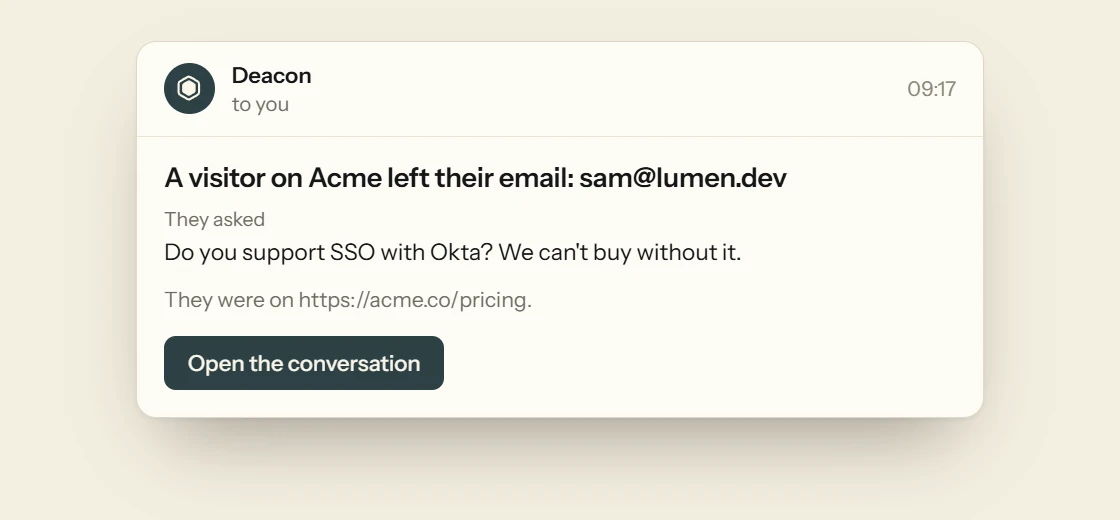
You get an email, unless you’re already looking
Nobody has to watch the chat. The owners on your team get an email 3 minutes after Sam leaves an address. It quotes what Sam last wrote, gives the page Sam was on and opens the conversation in one click. The short wait means a visitor who keeps typing sends you one email, not several. If someone on your team already has the dashboard open, or has opened the conversation, no email goes out, because the dashboard has told them.
Tuesday, 09:21
You reply, and Sam reads it in the chat
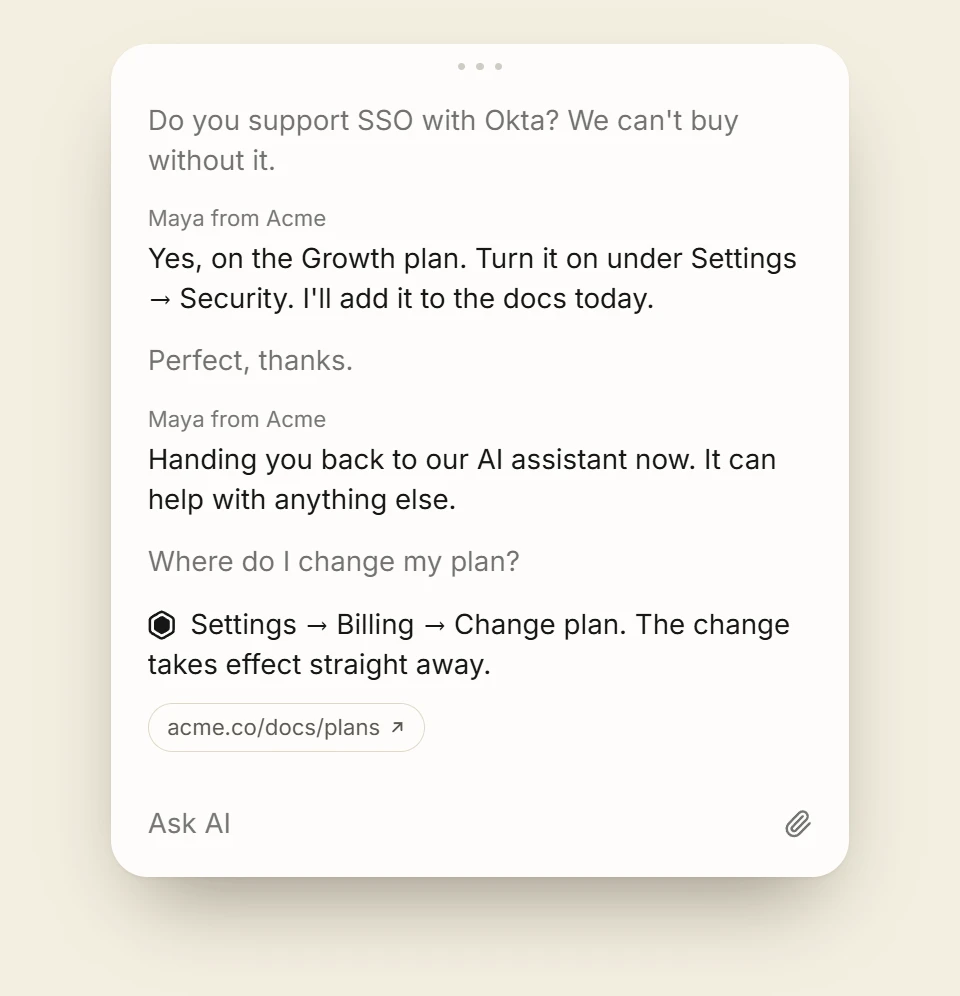
Open the conversation and type, adding up to 10 files if a screenshot or a PDF says it better. Sending your reply takes the conversation from Deacon, and Deacon stops answering in it. Sam still has the chat open, so your reply appears there under your first name and your company’s, and the box Sam types in changes from Ask AI to Reply to the team. The chat stays open to your reply for three days, and if Sam had closed it, a red count on the chat button would say a reply was waiting. If Sam doesn’t read your reply in the chat within a minute, it also goes to the address Sam gave, with the conversation so far.

Tuesday, 09:26
You hand it back when you’re done
While you hold the conversation, Sam’s messages come to your dashboard and Deacon stays out of it. They don’t count towards your plan’s answers, and they still arrive if this month’s answers have run out. Press Hand back to Deacon when you’re done. A line in your name tells Sam that the AI assistant is answering again, and Deacon answers Sam’s next question in seconds.
Test a handoff before a customer needs one
Install Deacon, ask it something your docs leave out, and reply from the dashboard. Your words appear in the chat, just as a customer would see them. You get 50 answers a month on the free plan, and it needs no card.
When a chatbot should hand over to a person
These hold for any support chatbot, whichever tool you use. The first five say when to hand over, and the rest say how.
When it can’t point to a source
A bot that answers without a source is guessing, and it’s guessing in your company’s name. If it can’t say where an answer came from, it should say it doesn’t know and pass the question on.
When the answer is a decision
Refunds, billing disputes, locked accounts and anything with legal weight need a person, even when your docs cover them. The customer is asking you to decide something, not to look something up.
When a sale hangs on it
A prospect asking about a missing feature, a contract term or a security review deserves a person, even if the reply comes the next morning. A guessed yes costs you later, and a guessed no costs you the sale.
The first time someone asks for a person
Take their details straight away. Making someone ask twice, or talk their way past the bot, turns a question into a complaint.
After a few questions that didn’t help
A customer who has answered the bot’s questions and still has no answer won’t get one by answering more. Sum up what they said and hand over.
Ask for one way to reply
An email address is enough. Every extra field loses some of the people who would have filled it in.
Pass on the whole conversation
Whoever replies should read everything the customer already said, so nobody is asked to repeat themselves.
Promise only a reply time you’ll keep
“We reply within a working day” helps if it’s true. If you can’t be sure, say you’ll reply by email and leave the time out.
Turn each handoff into an answer
The questions a bot hands you are the gaps in your docs. Answer each one where the next customer will look, and it stops coming back.
FAQ
Questions about human handoff
No. Deacon is built for founders who don’t have one. You reply from Deacon’s own dashboard, and the visitor reads your reply in the chat or gets it by email. There are no tickets, queues or rotas to run.
Yes, the simple kind a small team needs. Anyone on your team can reply inside any conversation, and a visitor with the chat open sees the reply there. The conversation says Visitor is here while they have the chat open. There’s no queue, routing or status for your team, so nobody has to sit waiting for chats. Chatbot vs live chat weighs the two for a founder. When you pick one up, our chat scripts have a first reply that doesn’t make them repeat themselves.
Deacon keeps answering their other questions, tells them the team will reply in the chat, and asks for their email. The owners on your team get an email, and you reply when you can. The chat stays open to your reply for three days, so a visitor who has gone sees a red count on the chat button and your reply when they next open the chat in that browser. If they left an address in that conversation and haven’t read your reply in the chat, it’s emailed to them too, and the first email carries everything said so far.
Your replies appear under your first name and your company’s, without the Deacon mark, and the box they type in changes from Ask AI to Reply to the team. No other notice says a person has joined. When you hand back, a line in your name tells them the AI assistant is answering again.
Yes, when they’re logged in to your app and your app passes Deacon their name and email. Conversations then lists their chat by name, so you know who’s waiting before you open it, and Logged in as, beside the conversation, gives their id, email and name. When Deacon can’t answer, the email field already holds their address, and one tap asks for your reply. On their own, these details are taken as your app sends them, unchecked, and they never reach the AI. When your server signs them as well, Deacon verifies them, and your reply goes to their inbox with nothing for them to tap. The “Do your users log in?” card on the Install page has a prompt your AI tool can follow to add it.
No. The owners are emailed when a visitor leaves an address, asks for a person, or writes back after you’ve replied. Each email waits three minutes, and it’s skipped if someone on your team has opened the conversation since or has the dashboard open.
No. Only replies Deacon writes are counted. Your replies and the visitor’s messages to you aren’t, and they still arrive after a month’s answers have run out. Once the answers have run out, though, Deacon can’t judge who is asking for a person, so the owners are emailed only when a visitor leaves an address or writes back to you.
What they’re stuck on and what they want next. Every question Deacon couldn’t answer is kept in Conversations, and Topics group similar questions, count how many people asked and label most of them, for example as a feature ask, a bug report or a how-to. When 12 people ask about Okta in a month, you know what to build or document next.
Not by itself. Deacon has no helpdesk or Slack integration, so a handoff comes to Deacon’s dashboard and to your email. A webhook can also tell your own code, which can pass it on.
Answer only the questions that need you
It takes about five minutes to install. The free plan is 50 answers a month, for as long as you like.