USE CASE
What to look for in a documentation AI assistant
The three ways to add an AI assistant to your docs, six tests for choosing one, and what the questions readers ask it say about your pages.
A documentation AI assistant answers your customers’ questions from your own docs, in a chat, in whatever words they use. Look for one that answers only from what your docs say, links the page it used, admits when the docs don’t cover a question and passes that question to you. It should also keep a list of the questions your docs didn’t cover. That list is worth as much as the answers, because it’s your missing docs, written by your customers.
Deacon is an AI customer support agent that works as a documentation AI assistant for founders who answer support themselves. It answers in seconds from your docs, on your docs site, in your app and anywhere else you add it. It also shows you what your customers are stuck on and what they want next. There’s a free plan, and it needs no card.
The same search also finds AI that helps you write documentation, such as the generators built into code editors. This page is about the kind your customers talk to.
Coding agents read your docs as well, and an llms.txt file at your site’s root gives them a short guide to which pages hold what. Our free llms.txt generator writes one from a form or your sitemap. With Deacon on your docs, your coding agent can also read what your readers asked.
Three ways to add an AI assistant to your docs
Which one fits depends on where your docs live and where your customers get stuck.
Use the one your docs platform has
If your docs are on a hosted platform, look at its plans first. Mintlify’s assistant comes with its Pro plan and above, and GitBook’s full chat comes with its Ultimate site plan, as each platform’s own docs said on 23 September 2026. It’s the least setup, because the platform already has your pages. Both can go in your app too, GitBook’s through an embed code on Ultimate and Mintlify’s through its API, with a widget you build from its tutorial. The best knowledge base software ranks GitBook among eight tools and says which plans answer customers with AI.
Add a hosted assistant with a script tag
A hosted assistant reads your docs from their web address or from files you upload, and goes on any site that takes a script tag. That matters because many questions start away from the docs. A buyer asks on your pricing page, and a customer gets stuck halfway through a task in your app. One assistant in all three places gives the same answers everywhere and keeps every question in one list.
Build your own
You can build one from parts, with something to split your docs into passages, a search index, a language model and a set of test questions. Getting it to answer takes days. Getting it to say “I don’t know” every time it should takes far longer, and that’s the part your customers will judge it on.
Six tests to run before your readers see it
Whichever you pick, try it on your own docs before any customer does. These six tests take ten minutes and catch most of what goes wrong.
- Ask something your docs don’t cover. A good assistant says it doesn’t know. A bad one invents an answer that sounds just like a real one.
- Ask for a number you’ve never written down, such as the price of a plan you don’t sell. It should decline rather than guess.
- Ask in your customers’ words, not your docs’ words. If your docs say “rotate credentials”, ask how to stop an old key working. It should still find the page.
- Paste an exact error message or code. Search by meaning blurs exact strings, so a good assistant searches by keyword too and finds the one page that names it.
- Ask in another language. It should reply in that language, from your English docs.
- Ask for a person. It should take a way to reach the customer and tell you, not send them round in circles.
Then click the link under an answer. It should open the page the answer came from.
Put it where the questions start
The docs site is where people go once they’ve decided to look something up. Plenty of questions come before that, so add the assistant in three places.
- Your docs, for the reader lost in the sidebar.
- Your app, for the customer stuck halfway through a task, who won’t go and search the docs. If your app passes the assistant details such as the customer’s plan, it can pick the answer that applies to them.
- Your pricing page, for the buyer with one question before they pay.
Docs often live at a different address from the app, such as docs.example.com and app.example.com. Check that your assistant runs on both and keeps their questions in one list.
What your readers’ questions say about your docs
Documentation is self-service support, and the questions it didn’t answer show you where it fell short. Each one points at one of three fixes. A heading uses different words from your customers, a page doesn’t exist yet, or the product doesn’t do what they want. Here’s how a month might look for an invented API product.
| What readers asked | Times asked | What it tells you |
|---|---|---|
| How do I stop an old API key working? | 11 | The page calls it rotating credentials, so put “revoke an old key” in its heading |
| What does error 429 mean? | 9 | The rate limits page never names the code, so add it |
| Is there a Zapier integration? | 7 | No page says there isn’t, so write one, and count it as a feature ask |
| Can I export my data as CSV? | 5 | Export is JSON only, so say so on the export page |
| Is there an SDK for Go? | 4 | Another feature ask, so add it to that list |
How do I stop an old API key working?
- Times asked
- 11
- What it tells you
- The page calls it rotating credentials, so put “revoke an old key” in its heading
What does error 429 mean?
- Times asked
- 9
- What it tells you
- The rate limits page never names the code, so add it
Is there a Zapier integration?
- Times asked
- 7
- What it tells you
- No page says there isn’t, so write one, and count it as a feature ask
Can I export my data as CSV?
- Times asked
- 5
- What it tells you
- Export is JSON only, so say so on the export page
Is there an SDK for Go?
- Times asked
- 4
- What it tells you
- Another feature ask, so add it to that list
Read the list once a week and start with the question most people asked. The page each question was asked from tells you where the docs let them down. And a page no answer has come from in months is either out of date or about something nobody asks. How to write knowledge base articles shows how to rewrite a page so readers and an AI agent both find it.
How Deacon works as a documentation AI assistant
Deacon answers your readers and shows you what your docs are missing, from one script tag, with nobody watching the chat.
It answers from your docs in seconds, at any hour and in the language the reader writes in. Your docs become an AI knowledge base, searched by meaning and by keyword, so a question in your customers’ words finds the right page and so does a pasted error code. When your docs don’t cover the question, Deacon says it doesn’t know instead of guessing and asks for the reader’s email. If they leave it or ask for a person, the owners on your team get an email. Reply from the dashboard, and your reply appears in the reader’s chat, with a red count on the chat button if they’ve closed it.
A developer in Osaka can ask in Japanese and read the answer in Japanese, taken from your English docs, with the English page linked under it.
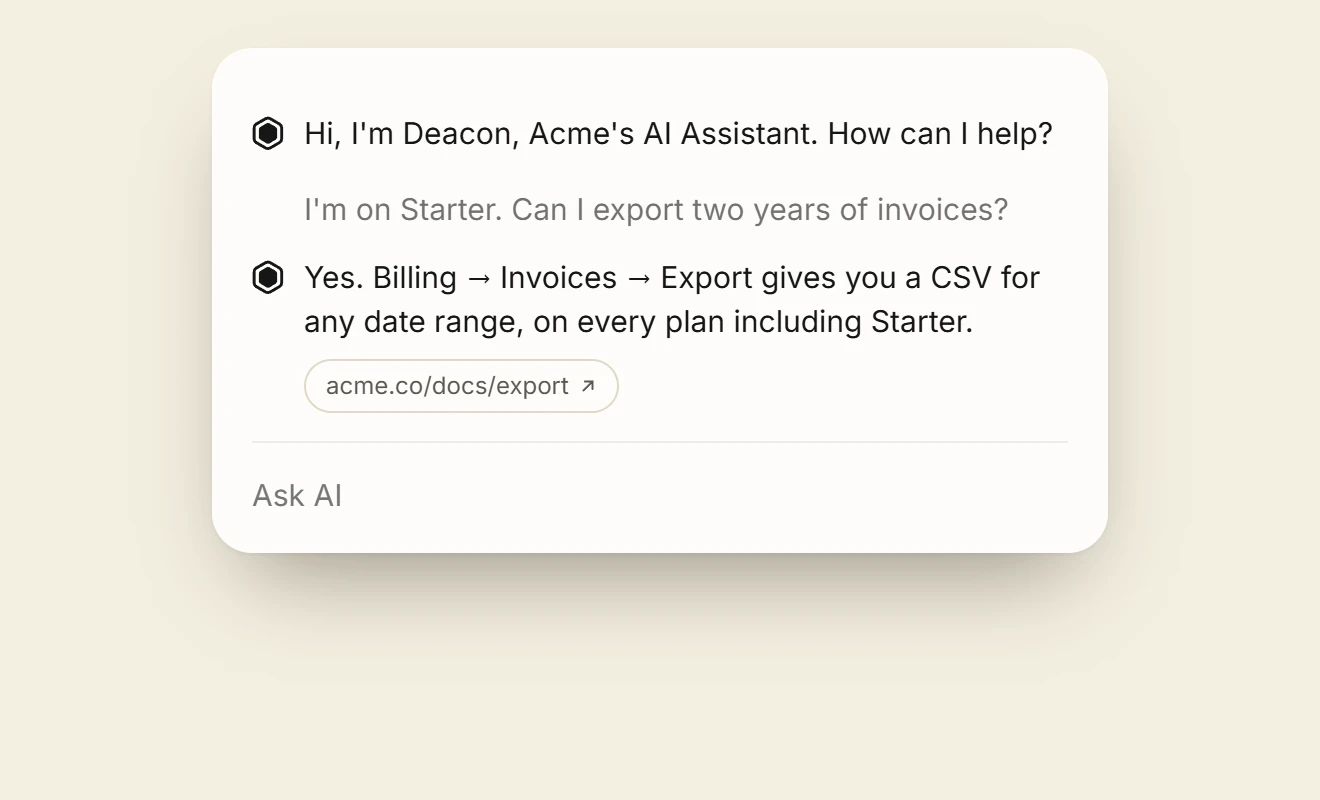
An answer taken from a page on your site usually carries a link to that page, like the one above. Answers drawn from uploaded files, pasted text or answers you wrote carry none, because those have no address. So add your docs as a website. When you sign up, Deacon learns by itself from your home page and main pages. Your docs’ front page can be one of them. You can untick any you’d rather it left out. On a paid plan you can crawl your whole docs site and tick the pages it learns from. How Deacon reads your docs goes through it step by step. When you ship, your release script can re-fetch the pages you changed through the API, so Deacon’s answers keep up with your docs.
One script covers your docs, your app and your marketing site. Your domain under Your sites on the Install page covers its subdomains too, so example.com covers docs.example.com and app.example.com with nothing more to add. Docs on another domain, such as a hosted help centre, need their own entry. Every question lands in the same Conversations list.
It shows you which pages work. On Analytics › Widget, Topics group readers’ questions, count the people who asked and label most of them as a how-to, a bug report, a feature ask and so on, and each topic shows how many Deacon answered and the source it answered from most. When readers on one page get stuck clearly more often than anywhere else on your site, Analytics › Widget names that page. It also compares how often questions not in English went unanswered with questions in English. Both wait until Deacon has tried 50 questions on each side, so one bad afternoon doesn’t set them off.
It gets better every time you answer. Each question your docs didn’t cover has an Answer this button. Write the answer once, as a reply or as rough notes, and press Save. Deacon adds it to your help document, in the section on that topic or a new one, and shows you how it now reads. It goes live at once, with no preview to approve, and Undo puts things back if it landed in the wrong place. Deacon then asks itself the reader’s question again, shows its reply under “Deacon now says” and lists any other open questions your answer covers. The help document is one more source beside your docs, so the next reader who asks can get the answer. If your answer corrects a page of your docs, fix the page too. Deacon reads the 20 passages that best match each question and doesn’t rank your answer above a page among them. The more you answer, the less it needs you.
Every feature is on every plan, including the free one, which needs no card and has no end date. There’s no badge to pay to remove, and nothing is billed past a plan’s answers.
Questions about documentation AI assistants
Will it make things up?
It can, if it’s allowed to fill the gaps from what the model already knows. Deacon answers only from the passages it finds in your docs for each question, and won’t give a price, a number, a date or a policy detail your docs never state. Why support bots make things up explains the rules behind that.
Does every answer link to a page of my docs?
No. An answer from a page on your site usually links to it, but not always. An answer from a file, pasted text or an answer you wrote shows no link, because none of those has an address.
Does it use the page the reader is on?
Deacon records the page and shows it to you beside the conversation, but doesn’t use it to answer. When a question is too vague to answer, such as “how do I change this?”, it asks one question back.
Should it replace the search box on my docs?
No, keep both. Search suits the reader who knows what the thing is called, and the assistant suits the one who doesn’t. You can add a button of your own beside the search box that opens Deacon with Deacon.open(), and hide Deacon’s launcher if you’d rather have one way in.
Can it answer questions about a customer’s own account?
No. Deacon can’t see anyone’s account, so it declines any question about a visitor’s own account, invoice or data and offers to take their email, and you reply. Human handoff shows how that reaches you.
How much of my docs will the free plan hold?
About 67 pages. The free plan holds 1 MB of text, and a page of docs is about 15,000 bytes of it. It also gives you 50 answers a month and needs no card. The paid plans hold more, and the pricing page has the figures.
Try it on your own documentation
Add your help pages, ask it the question you know your docs cannot answer, and watch it say so.
The free plan covers 50 answers a month on one seat, and the paid plans are on the pricing page.
Free plan, no card.
READ NEXT
How to set up an AI chatbot for documentation
Which pages to let it learn from, what happens to your docs inside it, how to test it on questions customers really sent and how to keep it current.
AI hallucination: what it is, with real examples
What an AI hallucination is, six real examples from Air Canada to Google, why chatbots make things up and how to make a support bot say it doesn’t know.
AI customer support for SaaS without a support team
Which questions AI should answer at a small SaaS, which must still reach you, and how to set one up on your site and inside your signed-in app.