USE CASE
AI customer support for SaaS without a support team
Which questions AI should answer at a small SaaS, which must still reach you, and how to set one up on your site and inside your signed-in app.
AI customer support for SaaS answers your customers’ questions in a chat, on your website and inside your app, from your own help content. At a small SaaS it should take the how-to and before-you-buy questions your docs already answer, and pass you anything about money, bugs or a customer’s own account. It should also show you what people keep asking, because at your size that’s the best product research you’ll get. Set it up that way and the repeat questions stop landing on you, without making you any harder to reach.
Deacon is an AI customer support agent for SaaS founders who answer support themselves. It answers your customers in seconds from your docs, says so when it doesn’t know instead of guessing, and shows you what they’re stuck on and what they want next. There’s a free plan, and it needs no card.
Which questions AI should answer at a small SaaS
Support at a SaaS company comes down to a few kinds of question, and each one has a right owner. Here’s how they split.
| Kind of question | For example | Who should answer |
|---|---|---|
| How to do something | How do I invite a teammate? | The AI, from your docs |
| Before buying | Is there an API on the cheapest plan? | The AI, from your pricing page |
| About their own account | Why was I charged twice? | You |
| A bug | The export button does nothing | You, with the conversation in front of you |
| A feature ask | Can you add Slack alerts? | The AI says plainly that you don’t, and you count it |
| Leaving | How do I cancel? | The AI says where the button is, and you ask why |
How to do something
- For example
- How do I invite a teammate?
- Who should answer
- The AI, from your docs
Before buying
- For example
- Is there an API on the cheapest plan?
- Who should answer
- The AI, from your pricing page
About their own account
- For example
- Why was I charged twice?
- Who should answer
- You
A bug
- For example
- The export button does nothing
- Who should answer
- You, with the conversation in front of you
A feature ask
- For example
- Can you add Slack alerts?
- Who should answer
- The AI says plainly that you don’t, and you count it
Leaving
- For example
- How do I cancel?
- Who should answer
- The AI says where the button is, and you ask why
The first two rows are usually the bulk of it, and they’re the ones worth handing to AI. The other four are where a wrong answer costs you money or a customer, so they should reach you, and quickly.
Put it where SaaS customers get stuck
Three places matter, and each one gets different questions.
- Your pricing page, where a buyer has one question before paying. An answer in seconds there is a sale you might otherwise lose to a closed tab.
- Inside your app, where logged-in customers get stuck halfway through a task and won’t go looking for your docs. Open the chat from your own Help button, tell it who’s logged in so you see who each conversation is with, and pass their plan, role or trial status, so it gives the answer that applies to them.
- Your docs, for the reader who searched and didn’t find it. On GitBook, AI answers for readers start on a paid plan, and GitBook alternatives compares how five other docs platforms handle them.
Anything you hand the chat from your app can be read in the customer’s browser. Pass what helps answer a question, and never a password, a token or an API key.
Keep money, bugs and account questions for yourself
A bot that guesses about billing is how you end up with a chargeback. Three rules keep those questions with you, whichever tool you use.
- Make it decline anything about a customer’s own account, invoice or data, since it can’t see them, and take their email instead.
- Make sure a bug report reaches you word for word, with the page it happened on, and that your coding agent can read it.
- Make asking for a person work the first time, every time.
Human handoff goes through when a chatbot should hand over, and how. Customer service experience sets out what else customers notice, from the wait to the language you answer in.
What to check before you pick a tool
Most AI support tools are built for a company with a support team and a helpdesk. Some of the ways they charge hurt a founder more than a team.
- Billing per resolution, which grows your bill as the tool does its job and again as your customer count grows.
- Credits that run out faster on a better model.
- Handoff, analytics or your own branding kept for the higher plans.
- A free plan that ends, or deletes an account after a few quiet weeks.
- A “powered by” badge inside your app, with a price to remove it.
- Weeks of building flows before it answers anything.
Actions are the other big difference. Some tools can issue refunds or change plans, through integrations with your billing system and your helpdesk. That’s worth it for a team working through thousands of tickets. For a founder, a tool that answers well and hands you the rest is usually the better trade. If you’re setting up support from scratch, customer support for startups puts each step in order.
How Deacon handles support for a SaaS
Deacon answers your customers in seconds, at any hour and in the language they write in, from your docs, your files and the answers you write. There are no flows or decision trees to build. When your content doesn’t cover a question, it says it doesn’t know instead of guessing and asks for the customer’s email. A customer can add a screenshot, a PDF or a Word file to a message, and Deacon reads it, copying out the error message, to answer what they’re showing it. The file stays with the conversation, so a bug report reaches you the way they saw it.
Inside your app, your team sees who each customer is, and Deacon answers for their plan. Pass Deacon the id, email and name of whoever is logged in, with window.deaconUser or Deacon.identify(), and each conversation shows who it’s with, under Logged in as. Those details are for you and never reach the AI. When your server also signs who’s logged in, with a secret from the Install page, Deacon verifies each customer. Their conversation gets a tick, their chats follow them from laptop to phone on your real site, and an owner can delete everything Deacon holds from one customer. Pass details such as the customer’s plan, role or trial status with Deacon.setContext(), a data-context attribute on the script tag or window.deaconContext. Deacon takes them into account when it answers, and shows them beside the conversation in your dashboard. After a log-in or an upgrade, Deacon.setContext() updates them without a page load. It takes up to 12 details and cuts each value at 200 characters, but drops them all if together they run past 1,500 characters. They never unlock questions about the customer’s account, which Deacon always declines, and if the customer says something different, Deacon goes with the customer. The code for passing them is in the guide to adding a chatbot.
Your own clicking around the app doesn’t have to muddy your traffic. Add data-no-page-views to the tag on your app’s pages, and page views and JavaScript errors from them stay out of Analytics › Website. A goal you send from inside the app, such as Deacon.track('Upgraded'), is still counted.
The page each question was asked from is kept with the conversation, so you can see where in your app people get stuck. App addresses often carry secrets, so the values of query parameters such as token, password, session or email are replaced with [redacted] before the address is stored.
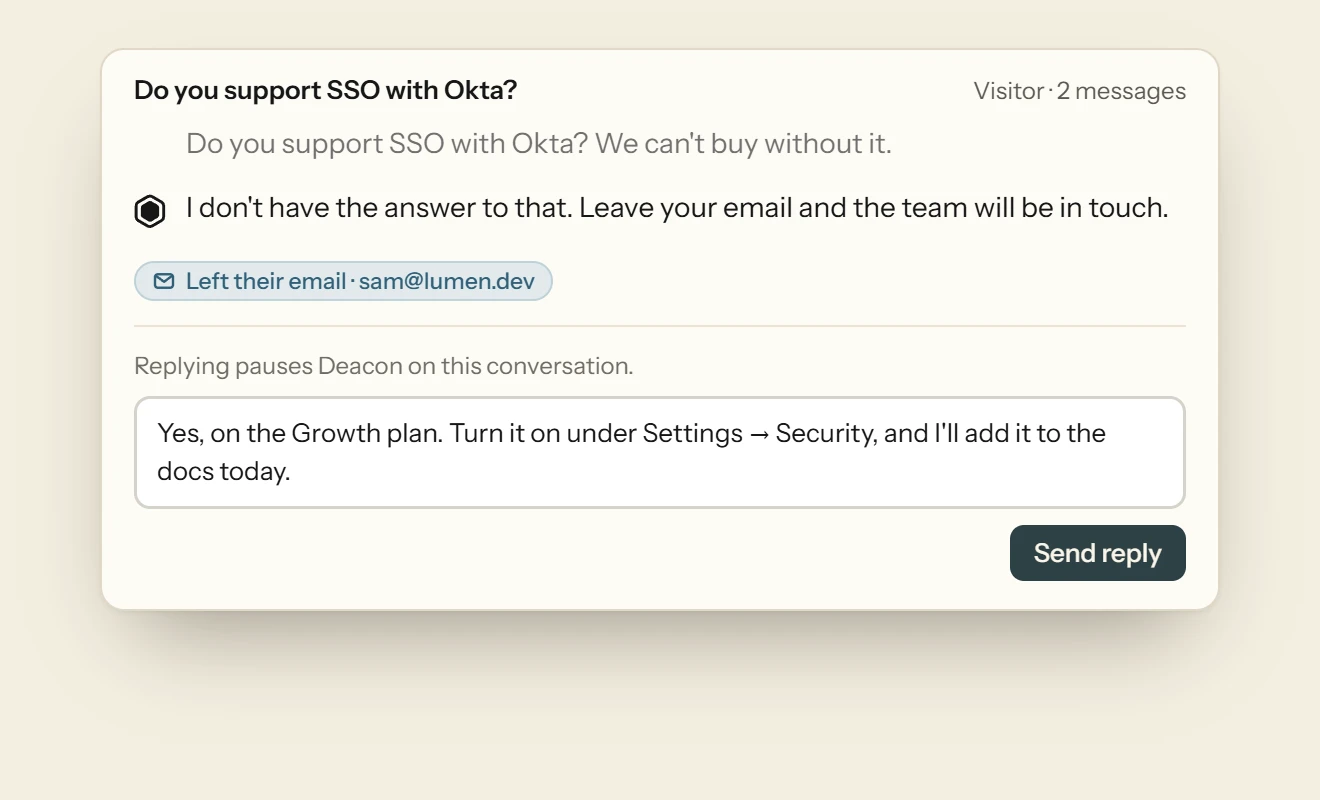
When a customer leaves their email or asks for a person, the owners on your team get an email three minutes later, unless someone has already opened the conversation or has the dashboard open. You reply from the conversation, and sending your reply takes it over from Deacon. A customer who still has the chat open sees your reply there, under your first name and your company’s, and the box they type in changes from Ask AI to Reply to the team. One who has closed it sees a red count on the chat button. If they haven’t read your reply a minute later, it’s emailed to them, as long as they left an address in that conversation. A logged-in customer doesn’t have to type one. When Deacon can’t answer them, the widget offers a reply to the email your app passed, in one tap, and a customer your server verified doesn’t even tap, since your reply goes to the email they’re signed in with. Press Hand back to Deacon when you’re done. Your replies, and the customer’s messages to you, never count as answers.
It shows you what customers want. Topics group questions that mean the same thing, count the people behind each and label most of them as a bug report, a feature ask, a how-to, a pricing question, an account and billing question and so on. When nine customers ask for a Slack integration in a month, you see one topic with nine people in it, and it opens on their own words. Every conversation is saved, and you can search them by what customers asked.
And it gets better. Every question your docs didn’t cover has an Answer this button. Write the answer once and it becomes part of what Deacon knows, so it can answer the next customer who asks. Press Save, and the panel shows what Deacon now says to that question, plus any similar open questions your answer covers too. The more you answer, the less it needs you.
Every feature is on every plan, including the free one, which needs no card and has no end date. The plans differ only in answers, knowledge, pages from your website and seats. Every plan answers with the same model, there’s no badge to pay to remove, and nothing is billed past a plan’s answers. The owners get an email when 80% of a month’s answers are used, and another when they run out.
Questions about AI customer support for SaaS
Can Deacon change a customer’s plan or issue a refund?
No. Deacon answers questions and hands conversations to you, and it takes no actions in other systems. It can tell a customer how to change their plan from your docs, but it can’t change it for them, and it declines any question about their own account, invoice or data.
What counts as an answer?
One reply Deacon writes on your live site, including one that says it doesn’t know. A reply that failed isn’t counted, and nor is the short fixed reply sent when nothing in your content matches at all. Chats in the Playground and from development addresses such as localhost are never counted, and neither are your replies or a customer’s messages to you.
What happens when a month’s answers run out?
Customers get a short reply saying Deacon can’t look into that one right now, and are asked for their email so you can reply, unless they’ve already left it in that conversation. Nothing is billed past your plan, no plan upgrades itself, and you can still read and reply to every conversation.
Does it work in a single-page app?
Yes. The conversation follows the customer from page to page and survives a reload, and a page view is counted each time your router changes the page’s path or query. When your app learns something new about the customer, such as an upgrade, Deacon.setContext() passes it on, and when someone logs in or out, Deacon.identify() updates the name your team sees on the conversation.
Does it connect to my helpdesk or Slack?
Not by itself. Deacon has no helpdesk or Slack integration, so a handoff comes to Deacon’s dashboard and to the owners’ email, and you reply from the dashboard. If you want it elsewhere too, a webhook can tell your own code.
How many people on my team can reply?
One on the free plan, three on Starter and ten on Growth. Anyone with a seat can read conversations and reply to customers.
Try it on your own documentation
Add your help pages, ask it the question you know your docs cannot answer, and watch it say so.
The free plan covers 50 answers a month on one seat, and the paid plans are on the pricing page.
Free plan, no card.
READ NEXT
How to reduce support tickets as a founder
Most support tickets are the same few questions in different words. Here’s how to find yours, fix each at its cause and keep the messages that need you.
What to look for in a documentation AI assistant
The three ways to add an AI assistant to your docs, six tests for choosing one, and what the questions readers ask it say about your pages.
How to use Deacon
Install Deacon with one script tag, teach it your docs, make it look like your site and answer what it misses, step by step. Free plan, no card.