Multilingual chatbot
Your customers don’t all write in English, and a multilingual chatbot lets each of them ask in their own language and get the answer in it. Deacon is an AI customer support agent that works this way from the start, built for founders who answer their own support. Keep your docs in one language, even if it’s English. Someone who writes in Spanish gets a reply in Spanish within seconds, drawn from those English pages, and there’s nothing to configure. The chat’s own buttons and labels switch to Spanish too, one of 40 languages they come in besides English. And Deacon shows you which languages your visitors write in and, once enough have asked, whether they’re answered as often as people writing in English.
On every plan, including the free one.
At a glance
| What it does | Lets every visitor ask in their own language and answers them in it, from a single set of docs. |
|---|---|
| Which languages | No list to pick from. Whatever language a visitor’s latest message is in, Deacon replies in that. Try your customers’ languages in the Playground to see for yourself. |
| The language of your docs | Whatever you wrote them in. English docs can answer a German question, and German docs an English one. |
| Written in their language | Every answer, every clarifying question, and the reply Deacon writes when your content doesn’t cover something. |
| In English and 40 other languages | Fixed wording that no model writes. That’s the chat window’s own text, such as the Ask AI box and the email prompt, the message that hands a chat back to the AI, and a few set replies, like the one sent after your month’s answers are used up. |
| Your side of the chat | Press Translate to read any conversation in your browser’s language. Anything you type is sent word for word, untranslated. |
| What you learn | How many questions arrive in each language and, once there are enough to compare, whether people writing outside English go unanswered more often. |
| Plans | Every plan, the free one included. A reply uses up your plan the same way in any language. |
What happens when a visitor writes in Spanish
Your docs are in English and a visitor writes in Spanish, and here’s what each of you sees.
The visitor asks in Spanish and gets a Spanish answer
The visitor types in Spanish and presses send. That’s all it takes, with no setting for you to switch and no menu for them to find. Deacon searches your English docs, finds the page on exporting invoices and replies in Spanish within seconds, usually with a link to that English page under the reply. It clarifies in Spanish too, and when your docs don’t cover a question, it says so in Spanish. Should the visitor carry on in French, the next reply comes in French.

You press Translate to read it in your language
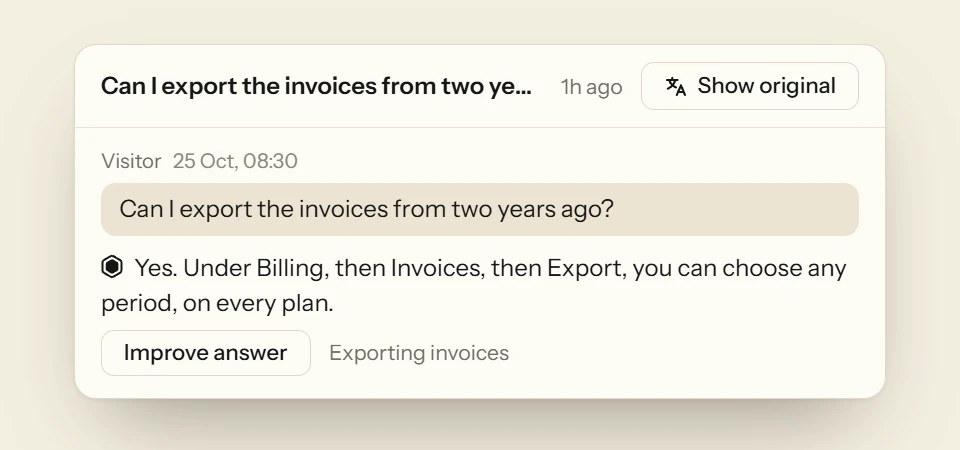
Say you only read English. Your dashboard offers a Translate button on any conversation that isn’t in your language, and one press shows the whole exchange in your browser’s language, the visitor’s messages and Deacon’s replies alike. Show original flips it back. Deacon keeps the translation, so it’s already in your language when you come back, and when new messages arrive a second press translates only those. None of it counts as an answer.
Analytics shows you which languages people write in
Once anyone writes in something other than English, Analytics › Widget says how many languages people wrote in and how many questions weren’t in English. Under More detail, a Languages list beside the map names the languages most used, and each one opens the conversations behind it. Once English and the other languages both have enough questions behind them, the page tells you if Deacon misses the questions that aren’t in English more often, so you know when visitors in other languages are being let down. Topics treat a question and its translation as the same question and name the group in English, so one count covers every language.

Ask Deacon something in another language
Add a few pages of your docs, then put a question to Deacon in the Playground in any language but the one your docs are in, and read the reply. Playground chats are never counted. You get 50 answers a month on the free plan, and it needs no card.
How to test a chatbot in a language you don’t speak
You can’t read the answers, so you need other ways to trust them. These checks work with any chatbot, before you tell customers you support their language.
Ask the same question in each language
Take five real questions and ask each one in English and in the languages your customers use. The facts should match every time, even when the wording doesn’t.
Check that the numbers survive
Prices, limits, dates and version numbers are where a translation goes wrong. Make sure a monthly price doesn’t turn into a yearly one, and that decimal commas and points come out right.
Match names to the screen
If your app is only in English, an answer that translates “Settings” sends a customer looking for a word that isn’t on their screen. Check that buttons, menus and plan names keep the names your product gives them.
Ask something it can’t answer
An honest “I don’t know” matters most in a language you can’t check. Make sure the bot admits it in that language, and says how a person will follow up.
Read what the chat window says
Placeholders, error messages and buttons often stay in one language even when the answers change. Decide whether that’s fine for your customers.
Have a native speaker read a handful of replies
A friend, a customer or a freelancer can tell you in ten minutes whether the replies sound natural or stiff. Do it once for each language before you advertise support in it.
Decide who replies when it hands over
Someone has to answer when the bot passes a chat on. Decide before launch whether that will be in the customer’s language or in English, and say which when you reply.
FAQ
Questions about multilingual support
No. Deacon replies in whatever language the visitor’s latest message is in, so rather than check a list, try it. Put a few real customer questions to it in the Playground, in the languages your customers use, and read the replies. Those chats don’t count against your plan.
No, one language is enough. Deacon answers every visitor in their own language from whatever you’ve written. If your site already has translated sections like /fr/, a crawl of your whole site on a paid plan leaves them out when your pages mark them as translations, because they duplicate pages Deacon can already read. Webflow and Framer add those marks for you. Sections that aren’t marked are kept, and Deacon points out the ones that look like translations, so you can keep them out. Want a translated page in anyway? Add it by itself as a link.
Yes, in 40 languages besides English. Everything the chat window says for itself, from the Ask AI box and the request for an email to the Try again button and the message that hands a chat back to the AI, comes in the chat’s language. So do the few set replies that no model writes, such as the one a visitor gets after your month’s answers are used up, and the email a visitor gets with your reply. The chat opens in your page’s language when it’s one of those other than English, or else in the visitor’s browser’s, and switches once Deacon replies in another. Someone writing in a language outside the 40 still gets Deacon’s replies in it, with the chat’s own words in the language it last spoke. The layout does change for Arabic, Hebrew and other right-to-left languages, where Deacon’s reply and what the visitor types both run right to left. You can write the greeting, the launcher’s label and the starter questions in any language you like, and when you publish, Deacon translates them into the chat’s languages. Until one is ready, visitors in that language see Deacon’s own greeting and label instead.
It goes by the words of their latest message, not their browser settings or where they are. For the language counts on Analytics › Widget it judges the words rather than the alphabet, so Hindi typed in Latin letters counts as Hindi.
Each reply follows the visitor’s latest message. Open in German and switch to Italian, and the answers switch to Italian with you.
Yes. An answer you write in your own language is a source like any other, so Deacon can use it for a question asked in any language and reply in the visitor’s. When you press Save, “Deacon now says” shows the reply to the visitor’s own question, so try another language in the Playground as well.
The conversation lands in your dashboard like any other, and Translate shows it in your language. Deacon doesn’t touch your reply on the way out, so either write back in the visitor’s language, with a translation tool if you need one, or tell them the team answers in English. Human handoff in Deacon
No. Every plan replies in every language, the free one included, and a reply in Japanese uses up your plan exactly as a reply in English does. Translating a conversation for yourself isn’t counted at all.
Let customers ask in their own language
It takes about five minutes to install. The free plan is 50 answers a month, for as long as you like.