FEATURES
Deacon features that answer your customers and show you what they need
Deacon is an AI customer support agent for founders who handle support themselves. It answers your customers in seconds from your own docs, gets better with every answer you write, and shows you what they’re stuck on and what they want next. Every feature is on every plan, the free one included. Follow one customer’s question below to see each one at work.
Free plan, no card. Paid plans from $40 a month, billed yearly.


YOUR CUSTOMERS
Tuesday, 09:14 · Sam has one question before buying
A widget that fits your site, with no badge to pay to remove
Customers ask their question right where they are, in a chat that looks like part of your site. Pick the colours, corner radius, position, greeting and starter questions against a live preview, and publish when it looks right. Deacon then translates your greeting, button label and questions into the 41 languages the widget speaks, so visitors read them in their own. Hide the launcher and open Deacon from your own Help button if you’d rather. Setup writes the first starter questions from your pages, and visitors can start a new chat or reread their recent ones. They can add a screenshot or a document to a message too, and Deacon reads it to see what they’re showing it. There’s no “powered by” line on any plan, including the free one.
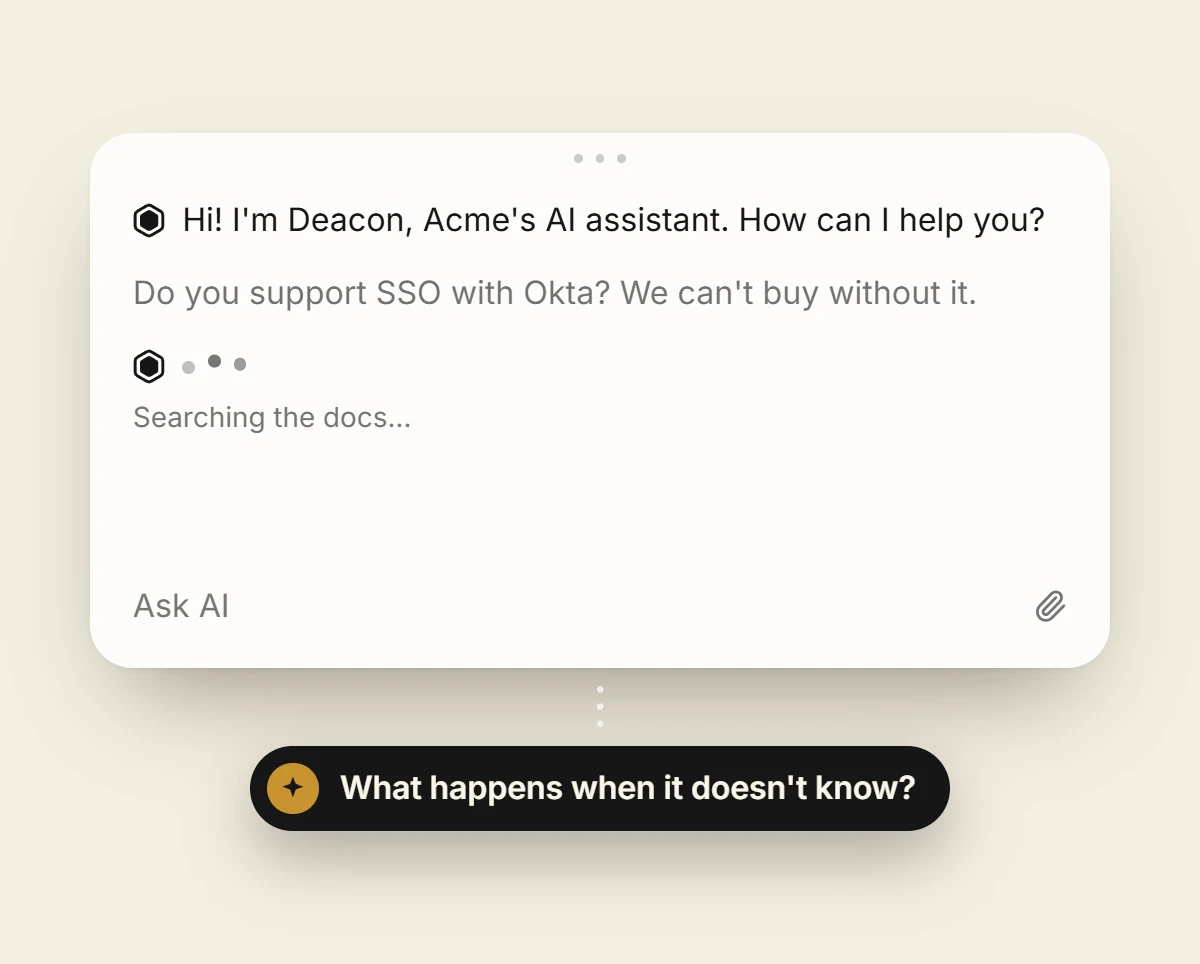
Sam’s team can’t buy without single sign-on through Okta, so Sam clicks Help on Acme’s pricing page and asks.
- Your colours, corners, position and greeting
- Your greeting and questions in 41 languages
- Nothing changes on your site until you publish
- A full-width sheet on a phone

Tuesday, 09:14 · Deacon searches what Acme gave it
Honest answers in seconds, or a plain “I don’t know”
The fear with any support bot is that it makes something up in front of a customer. Deacon writes each answer from the passages it finds in your own content, in seconds and in the language your customer wrote in, often with a link to the page it used. When your content doesn’t cover the question, Deacon says so and asks for their email, so nobody hits a dead end.
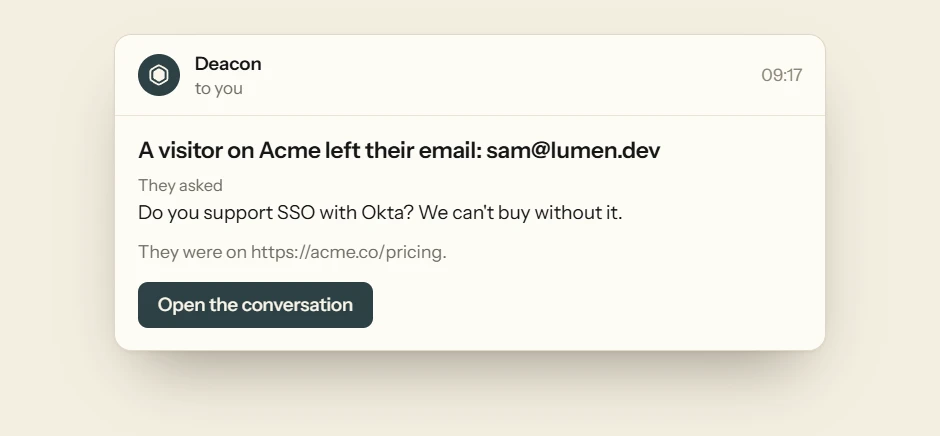
Most questions stop here, answered. Sam’s doesn’t, because Acme’s docs never mention Okta, so Deacon says it doesn’t know and Sam leaves an email address.
- Only what your content says, never a guess
- Answering at 3am while you sleep
- One question back when a question is vague

YOUR TIME
Tuesday, 09:17 to 09:26 · you get an email and answer in the chat
Human handoff, straight into your customer’s chat
Nobody has to sit and watch the chat. When a visitor leaves their email or asks for a person, the owners on your team get an email about it. You reply from the Deacon dashboard, so there’s no helpdesk to set up, and you can add files when a screenshot says it better. Your reply appears in the visitor’s chat under your name. The chat stays open to it for three days, so a visitor who has left sees a red count on the chat button and your reply when they come back. If they left an address and haven’t read your reply in the chat, it’s emailed to them too.
Sam still had the chat open, so your reply landed right under Deacon’s. Deacon stayed out of the conversation until you handed it back.
- No email if you’re already in the dashboard
- Messages to you never count as answers
- One button hands the chat back to Deacon

Tuesday, 09:30 · you teach Deacon the answer
Answer once, and Deacon gets better
Typing the same answer for the tenth time is time you should spend building. Each question your docs didn’t cover has an Answer this button in your dashboard. Write the answer once and it becomes part of what Deacon knows, so it can answer the next person who asks and needs you less over time. Press Save and Deacon puts it in your help document, then shows you the reply it now gives and the other open questions your answer covers too.
Your two sentences answered Sam and three other open questions about Okta and SAML. On Wednesday another visitor asked, got the answer in seconds, and you never heard about it.
- Answering as soon as you save
- The reply Deacon now gives, shown to you
- A count of the other questions it covers

Ask it your customers’ questions today
Add your website or a few files, then try the questions you answer every week in the Playground. The free plan has 50 answers a month and needs no card. No plan ever bills you past its answers.
YOUR BUSINESS
Any day · you read what Deacon told people
Conversation logs of every word said for you
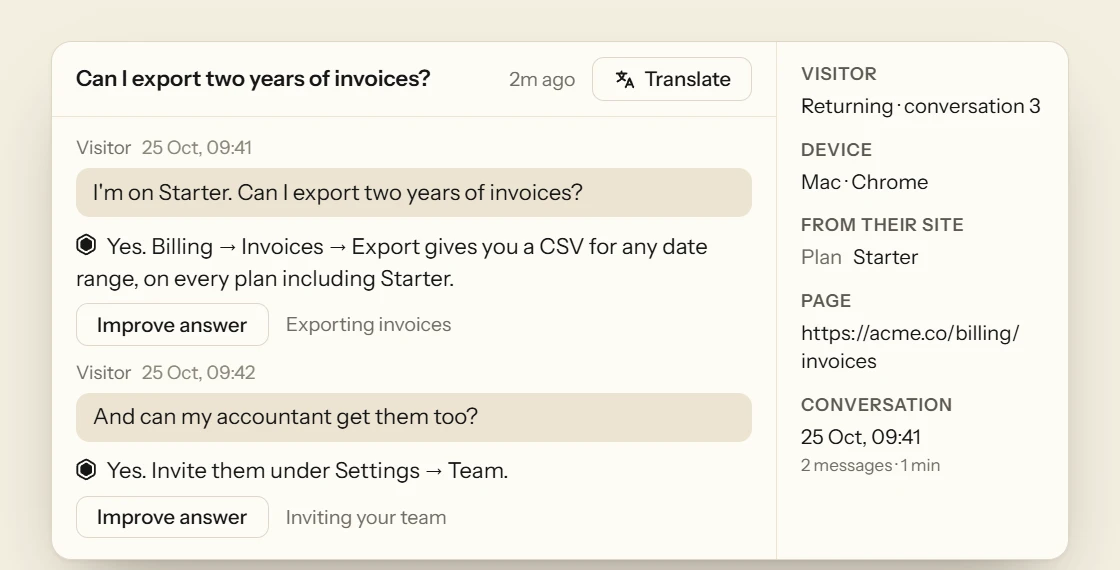
You’ll want to know what an AI told your customers, and it’s all here. Every conversation is saved in full, with any files the visitor sent, the source each answer named, the page the visitor was on, the topic their question joined and whether they’ve chatted before. The name of whoever is logged in, with a tick once your server verifies them, and details your app passes in, such as their plan, sit beside it.
Sam’s conversation sat under Unanswered until you wrote the answer. Then it moved to Answered.
- Tags for Unanswered, Wants a person, Answered and more
- Search by what visitors asked, or by their email
- A Translate button for any conversation
- Export as a CSV
Wednesday · the Okta questions add up
Topics that show what customers want next
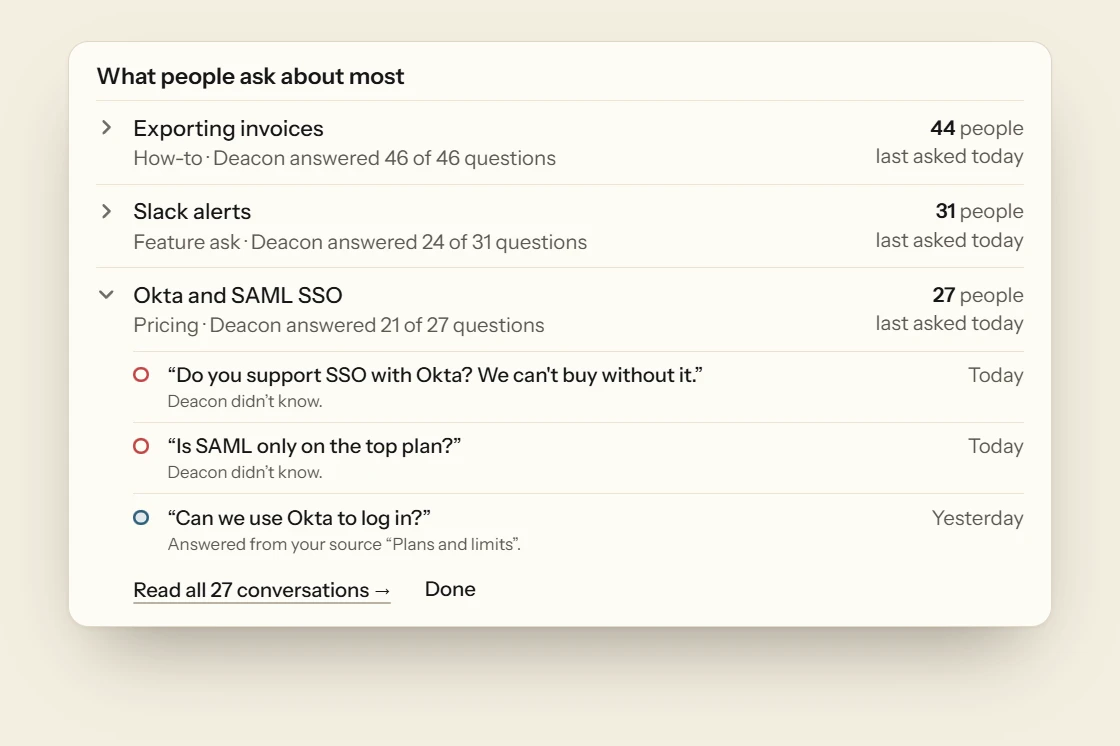
The customers who email you are the loud few. Deacon hears from everyone who asks, and groups their questions into topics with a count of the people behind each. Most topics get a type, such as a how-to, a feature ask, a bug report or a pricing question. Analytics › Widget lists what visitors ask you to build in their own words, and says how many questions Deacon answered and how many conversations it handled without you. What needs you then names your first job in one line, such as replying to the people waiting.
Sam’s question joined Okta and SAML SSO, third on the list with 27 people. It’s typed as a pricing question, which tells you single sign-on belongs on your pricing page.
- Ranked by the number of people asking
- Each topic opens on the questions in visitors’ own words
- Mark a topic done once you’ve dealt with it
Thursday · Sam comes back and signs up
Website analytics from the script you already added
The script that runs the chat also counts your visitors, so there’s no second analytics tool to add. See where people come from, with ChatGPT, Perplexity and the other AI assistants in one group, which pages they read and what devices they use. Name the goals that matter to you, such as a sign-up, build funnels from them, and see which sources send the visitors who reach your main goal. The JavaScript errors your visitors hit are listed one row per bug, with the visits each hit and the stack the browser sent, and each copies for your coding agent to fix.
Acme marked its sign-up button as a goal, so Sam’s sign-up is counted with the rest. Website analytics counts people and never names them or where they work.
- Goals from a line of code, an attribute or a class
- Funnels of two to five steps
- Nothing extra to install

More features, on every plan too
Sam’s question didn’t need these, but your customers’ questions will. No feature is held back for a higher plan. The plans differ only in answers, content, pages from your website and seats.
Replies in their language
Ask in German and Deacon answers in German, even when every doc you have is in English.
Multilingual chatbotVisitor context
Your app can pass Deacon the name and email of whoever is logged in, so you see who’s asking. Let your server sign them and Deacon verifies them, so your reply reaches their email and their chats follow them across devices on your real site. It can pass details such as their plan or role too, and Deacon takes those into account when it answers.
One clarifying question
A vague question gets one question back instead of a guess. After three, Deacon stops asking and passes it to you.
Four kinds of source
Your website, uploaded files, pasted text and the answers you write. Files can be PDF, Word, Markdown, text, CSV or HTML, and a scanned PDF works too.
Knowledge base chatbotInstructions
Tell Deacon in plain words how to talk to your customers. It can write a first draft from your landing page.
Playground
Try the real widget as any kind of visitor before your customers see it. Playground chats never count against your answers.
Team seats
A seat is one person who can read conversations and reply to customers. The free plan has one seat, Starter has three seats and Growth has 10 seats.
MCP server
Ask Claude Code, Cursor or another coding agent what broke this week, then have it fix your code.
MCP serverWebhooks
Deacon tells your code as soon as a visitor reports a bug or leaves their email, so it can open a ticket or add them to your CRM.
Chatbot webhooksAPI
Your release script can teach Deacon what you just shipped. Your admin panel can show a customer’s chats and reply to them.
Live chat APICSV export
Keep your own copy of every chat. Download them all as a CSV, or just the ones you’ve filtered to.
Chat transcriptsWhat Deacon doesn’t do
It has no helpdesk, tickets or flow builder, and no phone or WhatsApp. It answers on your website and hands the rest to you.
GET LIVE
Answering on your site within minutes
Sign up
Use your email or Google. The free plan needs no card and has no end date, and an account on it is only closed for inactivity after a year with no activity, with a warning first.
Add your content
Point Deacon at your website, upload files or paste text. There are no flows or decision trees to build.
Paste one line
Add the script tag before </body>, or copy the prompt for Claude Code, Cursor or Codex and your agent adds it and checks it’s live. On Shopify, Webflow, Lovable and other builders, Install shows that builder’s own steps.
Free plan, no card. Paid plans from $40 a month, billed yearly.