USE CASE
Framer chatbot plugins, or one line of Custom Code
The chatbot plugins in Framer’s Marketplace and what they cost, where a chatbot’s script goes in Custom Code, and what we found on live Framer sites.
Framer doesn’t make a chatbot for your visitors, so every Framer chatbot comes from another company. You add it with a plugin from Framer’s Marketplace, with the Intercom component in Framer’s Insert panel, or by pasting the company’s script tag into Custom Code. Whichever you pick, it’s priced on that company’s plans, not Framer’s. We read Framer’s help centre and each company’s pricing page on 23 September 2026, and tested live Framer sites the same day.
Deacon is an AI customer support agent that goes onto Framer as one script tag in Custom Code, on any Framer plan, the free one included. It answers your customers in seconds from your own pages, and it shows you what they ask about most. Deacon’s free plan gives you 50 answers a month, needs no card and has no end date.
Plugin, Intercom or Custom Code, and what each one does
Framer gives you three ways to add a chatbot, and two of them often end up in the same place.
A Marketplace plugin is the quickest start. With Chatloom’s, you open the plugin in Framer, sign in to your Chatloom account and pick your chatbot. The chatbot doesn’t run inside Framer, though. Framer’s plugin documentation says a plugin can install code on your site as script tags, so Chatloom’s writes its tag into your custom code for you, and you can switch it off there. Not every plugin works that way. AssistLoop’s guide has you drag its component onto your canvas and paste in your agent’s ID instead.
The Intercom component is the one chat tool among the integrations in Framer’s help centre. Framer’s Intercom guide has you drag it from the Integrations section of the Insert panel onto your canvas and paste in your Intercom workspace ID. Intercom has no free plan, so once its 14-day trial ends you need a paid Intercom plan behind it.
Custom Code takes any chatbot’s script tag. You paste it once in your project’s settings and it loads on every page. That’s how Deacon goes in, and it’s where a plugin such as Chatloom’s puts its tag anyway.
What the chatbots you can add from Framer cost
These are the chat tools you can add from inside Framer, the Intercom component in its Insert panel and two of the AI chatbot plugins in its Marketplace. Here’s what each gives you before you pay, as the companies’ own pages put it on 23 September 2026.
| Chatbot | How it goes on | What’s free |
|---|---|---|
| Intercom | The component in Framer’s Insert panel | No free plan, only a 14-day trial. A seat on Essential is $19 or $29 a month billed yearly, or $29 or $39 monthly, depending on which side of a price test you land on. Fin, Intercom’s AI agent, costs from $0.99 per outcome on top. |
| AssistLoop | A Marketplace plugin | 150 credits every 30 days, which AssistLoop says are not conversations. Its branding comes off on Basic, at $29 a month or $300 a year. |
| Chatloom | A Marketplace plugin | 100 messages a month for one AI agent. Its branding comes off on Basic, at $29 a month on monthly billing. |
| Deacon | One script tag in Custom Code | 50 answers a month from your own pages, with no card and no end date. Every feature is included, and there’s no badge to pay to remove. |
Intercom
- How it goes on
- The component in Framer’s Insert panel
- What’s free
- No free plan, only a 14-day trial. A seat on Essential is $19 or $29 a month billed yearly, or $29 or $39 monthly, depending on which side of a price test you land on. Fin, Intercom’s AI agent, costs from $0.99 per outcome on top.
AssistLoop
- How it goes on
- A Marketplace plugin
- What’s free
- 150 credits every 30 days, which AssistLoop says are not conversations. Its branding comes off on Basic, at $29 a month or $300 a year.
Chatloom
- How it goes on
- A Marketplace plugin
- What’s free
- 100 messages a month for one AI agent. Its branding comes off on Basic, at $29 a month on monthly billing.
Deacon
- How it goes on
- One script tag in Custom Code
- What’s free
- 50 answers a month from your own pages, with no card and no end date. Every feature is included, and there’s no badge to pay to remove.
Each one counts something different. Intercom charges for an outcome, such as a customer saying their issue is resolved, or asking for nothing more after Fin replies. AssistLoop counts credits and Chatloom counts messages. Deacon counts answers, one per reply, and a conversation takes about 2 of them, so 50 answers covers about 25 conversations.
Where a chatbot’s script goes in Framer
Framer’s custom code guide, updated on 7 August 2026, names chat and support widgets among the things Custom Code is for. These steps work for any chatbot’s tag.
- Open Project Settings and choose the Custom Code tab.
- Click Add Script, or the + icon if the site already has some code.
- Give it a name you’ll recognise, such as the chatbot’s.
- Place it where the chatbot’s instructions say. Deacon’s goes at the end of the body.
- Leave it on every page.
- Choose how often it runs. The next section explains the choice.
- Publish, then look at your live site. Framer’s Academy lesson on custom code says Framer doesn’t load custom code in the canvas preview.
Once, or on every page visit
The choice matters because a Framer site changes pages without reloading. On 23 September 2026 we followed links on framer.com and on wisdom.ai, a site from Framer’s gallery. Each time the address changed in place, and an element we had added to the first page was still there on the next.
Once runs the code a single time. Run on every page visit runs it again each time someone opens a page. A chatbot that follows page changes by itself wants Once, and Deacon does. It notices each new page, counts it as a page view and keeps an open chat open while the visitor moves around.
Custom Code on Framer’s free plan
Framer’s guide names no plan for custom code, and on 23 September 2026 we found free sites, still showing the Made in Framer badge, publishing their own custom code. What the free plan doesn’t give you is your own domain. A free site lives on a Framer address, and Framer’s pricing page says connecting a custom domain needs a paid plan.
The badge gets in a chatbot’s way. On every free site we checked, Framer fixed it to the bottom-right corner, where chat buttons such as Intercom’s and Deacon’s sit unless you move them, so the two overlap.
What survives a redesign
Custom Code lives in your project’s settings, not on a page, so redesigning pages, swapping sections or rebuilding the navigation leaves the tag where it is. A new project doesn’t bring it along. If you rebuild in a fresh project and move your domain across, Framer’s guide to moving a domain tells you to set up the new project’s settings again, and your chatbot’s tag is one of them.
Staging, on Pro and above, has an address of its own. Framer’s staging guide uses your site’s base domain, the framer.app address it gets on first publish, as the staged preview. A chatbot that only runs on the domains you allow stays hidden there until you allow that one too.
What Deacon does on your Framer site
Most of what your visitors ask, your pages already answer. They don’t find it, so they ask you, and every repeat question takes you away from building. Deacon answers those questions in seconds, at any hour, from the pages on your site and in the language each customer writes in. An answer taken from one of your pages often links to it, so they can read on.
When your pages don’t cover a question, Deacon says it doesn’t know rather than making something up, and asks for the visitor’s email. If they leave it, or ask to talk to a person, you get an email. Reply from Deacon’s dashboard, and your reply shows up in their chat under your name, with a red count on the chat button if they’ve closed it.
Every question your pages didn’t cover then waits in the dashboard with an Answer this button. What you write becomes part of what Deacon knows, so it can answer the next person who asks, and it needs you a little less with every answer you write.
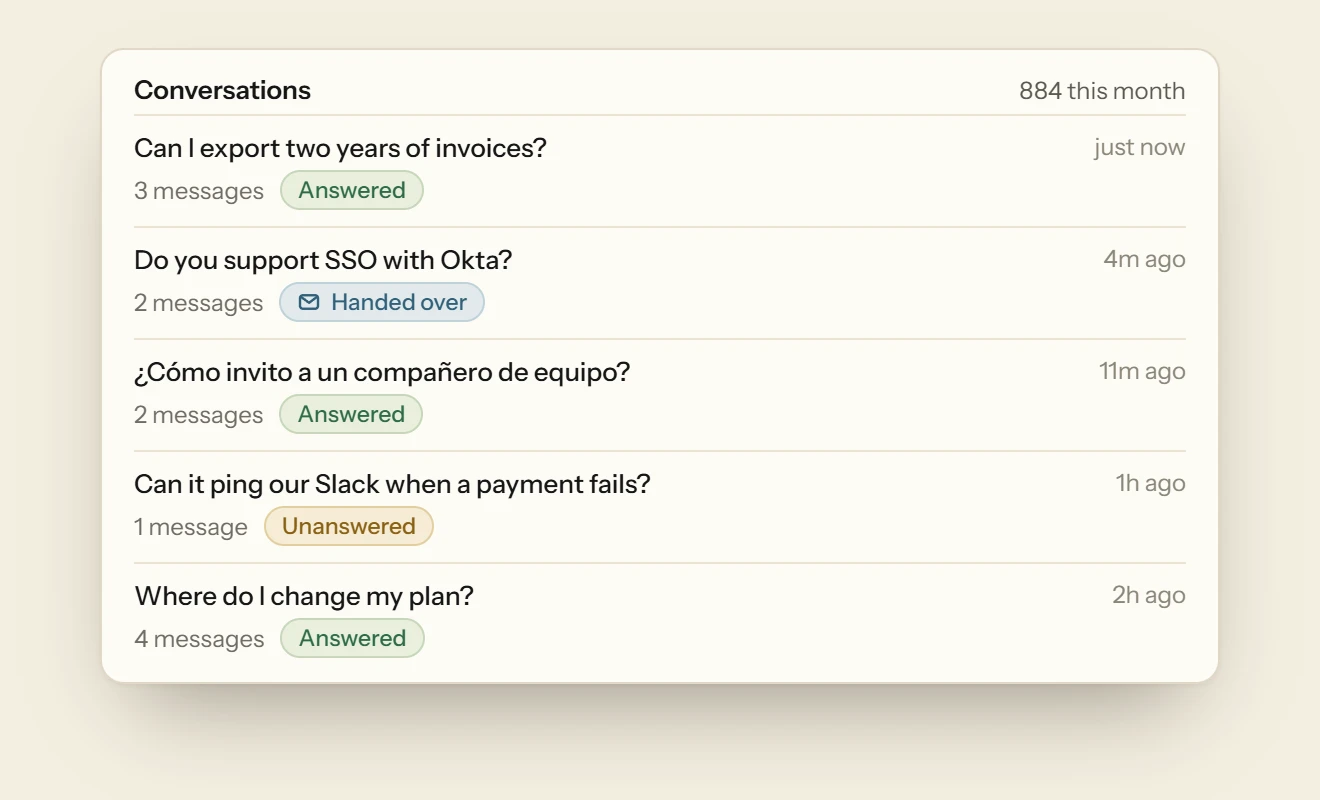
You also hear from everyone who asks, not only the few who email. Every conversation is saved and searchable by what visitors asked. Topics groups related questions, counts how many people asked and labels most of them, such as a feature ask, a bug report or a how-to, so you can see what to fix and what to build next.
The same script counts your Framer site’s traffic on Analytics › Website, with visits, sources, goals and funnels. Each in-place page change counts as a page view, so there’s no second analytics tag to add to Custom Code.
Every plan answers with the same model, so there are no credits that drain faster on a better one, and there’s no charge per outcome. Every feature is on every plan, the free one included, and there’s no badge to pay to remove. Nothing is billed past your plan’s answers, and no plan upgrades itself. The pricing page has the paid plans.
Adding Deacon to Framer
Deacon needs no plugin. The snippet it gives you looks like this, with your own key in place of the placeholder.
<script src="https://heydeacon.com/widget/v1/loader.js" data-key="pk_your_widget_key" async></script>
It takes a few minutes.
- Sign up with your email or Google, and give Deacon your site’s address. The free plan needs no card. Deacon reads your home page and up to four pages it links to that visitors ask about first, such as pricing and help, and learns from each as it arrives.
- On the Install page, check your site’s domain is listed, and add it if it isn’t. The website you gave when you signed up is already there, with your snippet ready, and it covers your address with or without www. Deacon appears only on the domains you list, so add your framer.app address as well if you want it on staging.
- In Framer, add the snippet in Project Settings › Custom Code, at the end of the body, on every page and set to Once. Then publish.
- Once Deacon has read your pages, untick any in Knowledge Sources you’d rather it didn’t use, and add other pages one at a time by their address. If you use Framer’s Localization, there’s no need to add the translated copies under paths such as
/de, because Deacon replies in the language each visitor writes in. - Ask it your customers’ questions in the Playground before anyone else sees it.
What to check after you publish
These five checks take a couple of minutes.
- Open your published site in a private window. The canvas preview won’t show Deacon, because Framer doesn’t load custom code there.
- On a free Framer site, look at the bottom-right corner. If the Made in Framer badge sits under Deacon’s button, move the button to the bottom left, or raise it with an offset, in Appearance.
- Open the chat and follow a link to another page. The chat should still be open, and both pages should appear on Analytics › Website.
- Look at the top of the Install page. It says whether Deacon is live on your site and when it was last seen, and it keeps checking by itself.
- Ask one question your pages answer and one they don’t. The first should get an answer, and the second an honest “I don’t know” with a box for an email address.
Questions about Framer chatbots
Does Framer have a chatbot of its own?
No. Framer’s AI features help you build and translate your site, and none of them answers your visitors. The nearest thing Framer builds in is the Intercom component, which needs a paid Intercom plan behind it once Intercom’s 14-day trial ends.
Can I add a chatbot to a free Framer site?
Yes. Framer doesn’t keep custom code for its paid plans, and free sites publish it like any other. Two things differ on a free site. The Made in Framer badge takes the bottom-right corner, where a chat button usually goes, and the site stays on a Framer address, because your own domain needs a paid plan.
Is there a Deacon plugin for Framer?
No, and you don’t need one. A plugin such as Chatloom’s writes a script tag into your site’s custom code, and Deacon’s tag goes in the same place by hand in about a minute.
Why can’t I see my chatbot in Framer?
Framer doesn’t load custom code in the canvas preview. Publish, then open your live site.
Should the script run Once or on every page visit?
Once, for Deacon. Framer changes pages without reloading, and Deacon follows each change itself, counting it as a page view. If it does run a second time, the second copy finds the first one already running and does nothing.
Can I show the chatbot on only some pages?
Framer’s page list decides where the script loads. Once Deacon has loaded, though, it stays for the rest of the visit, because Framer changes pages without reloading. Deacon’s own list works by domain and covers every page on each one.
Can Deacon count sign-ups on my Framer site?
Yes. A goal, such as a click on your sign-up button, is sent by a data-deacon-goal attribute on the button or by a call to Deacon.track(). On Framer you add an attribute to an element with a code override, a few lines of React that Framer’s override examples show. The goals document has Deacon’s side.
What happens when Deacon’s free answers run out?
Each visitor who asks gets a short reply saying Deacon can’t look into that one right now, and is asked for an email, unless they left one earlier in the conversation. You can still read and reply to every conversation in the dashboard. Nothing is billed, and your plan stays as it is.
Try it on your own documentation
Add your help pages, ask it the question you know your docs cannot answer, and watch it say so.
The free plan covers 50 answers a month on one seat, and the paid plans are on the pricing page.
Free plan, no card.
READ NEXT
How to use Deacon
Install Deacon with one script tag, teach it your docs, make it look like your site and answer what it misses, step by step. Free plan, no card.
Adding a Webflow chatbot, and the plan it needs
Which Webflow plans let you add a chatbot’s script, what the AI chatbot apps in Webflow’s marketplace cost, and how Deacon carries a chat from page to page.
What to do in the week after launching a website
The checks to run before you post the link, the four numbers worth watching on launch day and what to do with the questions your first visitors send.