GUIDE
AI customer service: how it works and what it costs
AI customer service answers customers from your docs. See what it handles, when it needs you and how each vendor bills it, with prices read on 24 November 2026.
Published
AI customer service is software that answers your customers’ questions for you, in seconds and at any hour, by finding the answer in your own help content and writing a reply in a chat or an email. A good one says when your content doesn’t cover a question and gets the customer to a person instead of guessing.
It suits a small company once the same questions arrive every day and the person answering them is also the one building the product. It takes the questions your docs already answer and leaves you the ones that need a decision, an account or a fix.
Deacon is an AI customer support agent made for that founder. It answers your customers on your website from your own content, hands you the conversations that need you, and shows you what customers keep asking. There’s a free plan, and it needs no card. Every rival price on this page was read on the vendor’s own pages on 24 November 2026, and each one links there.
What AI customer service does
Vendors sell four different jobs under the name AI customer service, and most lead with one or two of them.
- It answers from your content. It reads a customer’s question, finds the passages in your help pages, docs or files that fit, and writes a reply from them. Most questions a small team gets are this kind, such as how to do something, what a plan includes or whether a feature exists.
- It acts in your other systems. Some products, usually sold as AI agents, refund an order, cancel a subscription or change an address, through connections to your billing or your store and rules you write for each action.
- It helps a person reply. Inside a helpdesk, AI drafts replies, summarises long threads and suggests articles for the human agent, who still sends the answer.
- It sorts and counts what customers ask. It groups questions by topic and kind, so you can see which docs are missing and what people want built.
A small team usually needs the first and the last. Most of what reaches a founder is a question with an answer written down somewhere, and acting on a customer’s account only pays once the same request turns up often enough to write rules for it. AI agent vs chatbot sets out where answering ends and acting starts, and conversational AI for customer service follows one support chat turn by turn.
Deacon does the first and the last of the four. It answers from your website pages, files, pasted text and the answers you write, and it takes no actions in other systems, so it won’t refund an order or change a customer’s plan. When something does need changing, your own code can act on what Deacon hears. A webhook tells your server when a customer reports a bug, asks for a feature or wants a person.
How AI customer service answers a question
AI customer service built on a language model answers in two steps. It searches your content for the passages closest to the question, and then the model writes a reply from those passages, in the customer’s own language. Answering only from what was found is called grounding, and grounding AI explains the search behind it.
When the search finds nothing that answers the question, a grounded bot says so. A bot that answers from the model’s training, or one told always to be helpful, writes something plausible instead, which is how a support bot ends up promising a refund policy you don’t have. Why chatbots make things up covers the causes and what stops each one.
Deacon searches your content two ways, by meaning and by keyword, and writes its answer from the passages that fit best, in seconds. When the answer comes from a page on your site, a link to that page usually sits under the reply.
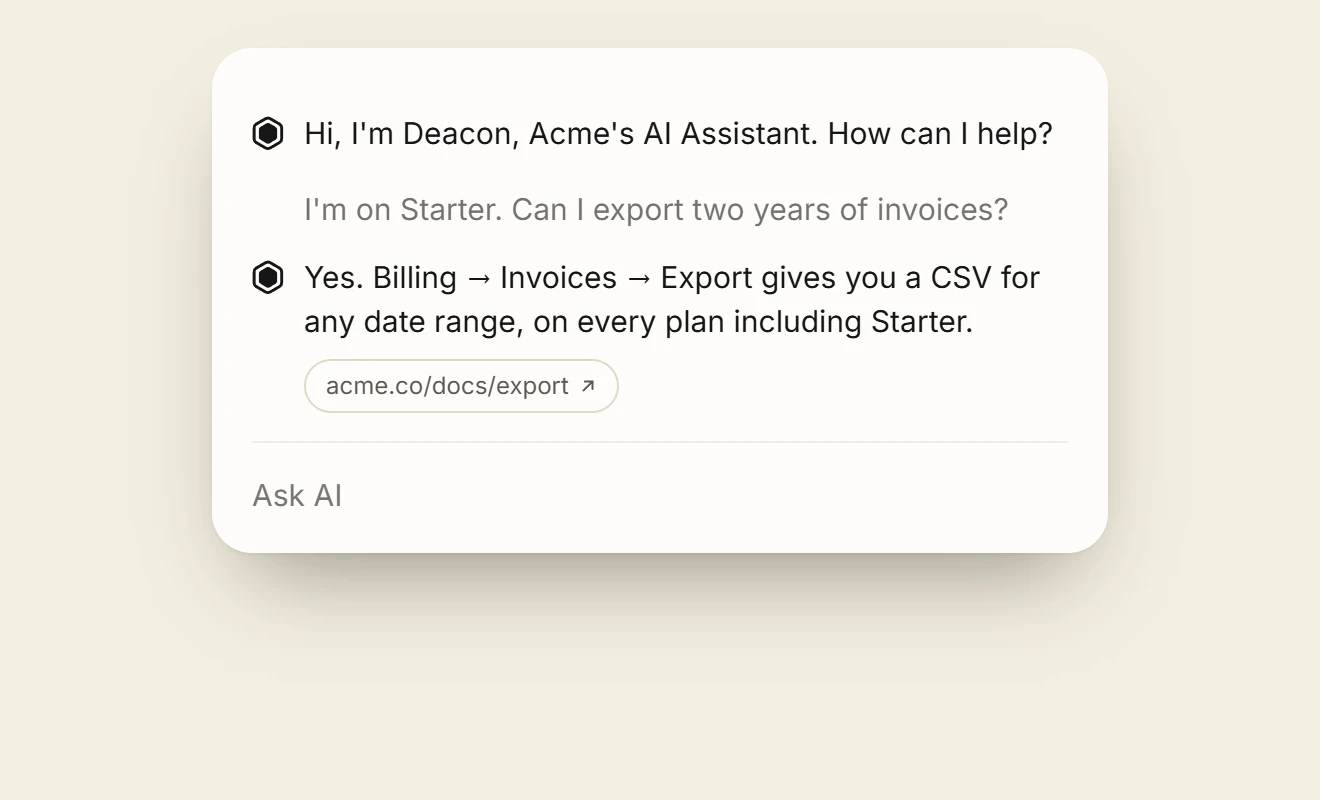
When your content doesn’t cover the question, Deacon says it doesn’t have the answer and names what was asked as the thing your team will get back to the customer about. A typical decline reads “I don’t have the answer to that. Leave your email below and the team will get back to you about invoices in euros.” It never hints at an answer either way, and the chat offers the customer a box for their email. The question then waits in your dashboard for you to answer once.
Which questions to hand to AI customer service
Hand over first the questions you answer the same way every time. Deacon’s Topics give a group of similar questions one of seven types when one kind leads it, and the same seven make a good checklist for what to give AI customer service and what to keep.
| Kind of question | A customer might ask | Who should answer it |
|---|---|---|
| How-to | “How do I invite a teammate?” | The AI, from your docs |
| Pricing | “Does the yearly plan include SSO?” | The AI, from your pricing page |
| Feature ask | “Can you add a calendar view?” | The AI says what exists today, and you decide what to build |
| Bug report | “Export fails with an error every time” | You, once you’ve seen how many people hit it |
| Account and billing | “Why was I charged twice in August?” | You, since the answer is in their account |
| Wants a person | “Can I talk to someone?” | You, the first time they ask |
| Feedback | “The new editor is much faster” | You’ll want to read it yourself |
How-to
- A customer might ask
- “How do I invite a teammate?”
- Who should answer it
- The AI, from your docs
Pricing
- A customer might ask
- “Does the yearly plan include SSO?”
- Who should answer it
- The AI, from your pricing page
Feature ask
- A customer might ask
- “Can you add a calendar view?”
- Who should answer it
- The AI says what exists today, and you decide what to build
Bug report
- A customer might ask
- “Export fails with an error every time”
- Who should answer it
- You, once you’ve seen how many people hit it
Account and billing
- A customer might ask
- “Why was I charged twice in August?”
- Who should answer it
- You, since the answer is in their account
Wants a person
- A customer might ask
- “Can I talk to someone?”
- Who should answer it
- You, the first time they ask
Feedback
- A customer might ask
- “The new editor is much faster”
- Who should answer it
- You’ll want to read it yourself
How-tos and pricing questions are where AI customer service saves you the most time, because the answer is written down and doesn’t change from one customer to the next. Bug reports and feature asks are worth counting even when the AI can’t settle them, because ten people reporting the same error tell you more than one angry email. The AI can also answer questions about what your product can do, such as “can it export to PDF?”, straight from your docs.
Account and billing questions need a person, or an AI connected to your billing that checks who’s asking. Deacon always declines a question about a visitor’s own account, invoice or data, whatever your content says, and offers them a box for their email instead of a guess. Customer insights from the questions customers ask covers what to do with each kind once you can count them.
When a customer wants a person
The usual worry about AI customer service is a customer who wants a person and can’t reach one. The way to a person should work the first time someone asks, in the same chat, without them starting again or typing “agent” over and over.
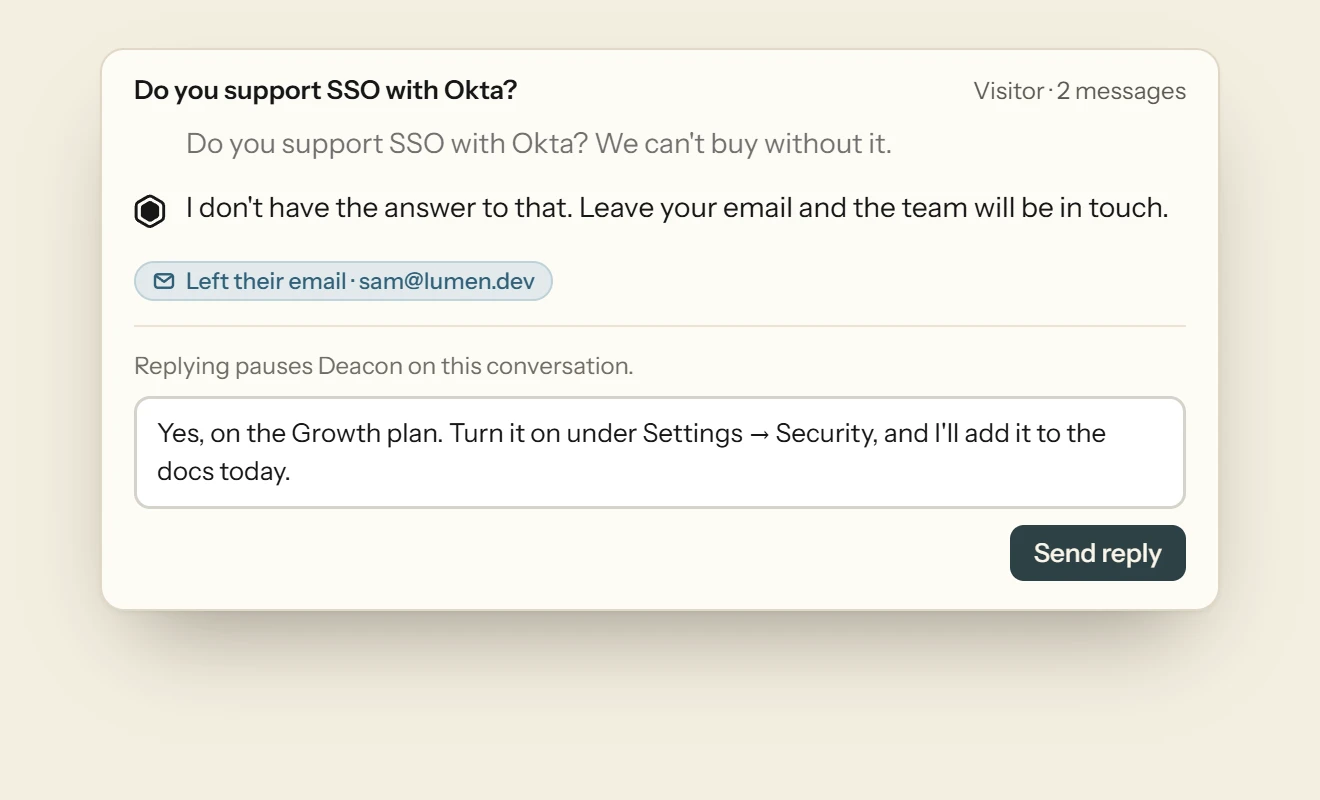
When a visitor asks Deacon for a person, it tells them the team has been told and will reply right there in the chat, and by email too, at the address they left or one they leave below. It never tells them it can’t connect them. Any hand-over after their first message opens with one sentence summing up what they’ve told Deacon, so you don’t have to ask again.
Your team sees the conversation in the dashboard at once, and the owners get an email about three minutes later if nobody on the team has seen it there. You reply from Conversations, and your reply appears in the visitor’s chat under your first name and your company’s, such as “Maya from Acme”. Deacon stops answering in that conversation until you press Hand back. The chat stays open for three days while the customer is waiting on you. If they’ve closed it, a red count on the chat button shows your reply is waiting, and if they don’t read it in the chat within a minute, it goes to the email address they left in that conversation.
Try Deacon for free
Install DeaconHow AI customer service is billed
Vendors bill AI customer service by what it settles, by the conversation, in credits or at a set price for a plan, so your bill grows with your traffic in a different way on each. Each price below links to the vendor’s page where we read it.
| Vendor | What it counts | Price | Read on |
|---|---|---|---|
| Fin | An outcome, such as a conversation it resolves, at most one a conversation | $0.99 an outcome, plus your helpdesk’s seats. On a helpdesk other than Intercom, at least 50 outcomes a month | 24 November 2026 |
| Zendesk AI agents | An automated resolution, a request resolved with no escalation to a person | 5 automated resolutions an agent a month come with Suite Team, at $55 an agent a month billed yearly. Then $2.00 each as you go, or $1.50 committed | 24 November 2026 |
| Help Scout’s AI agent, Scout, billed as Envoy | A resolution, a conversation Scout settles with no help from a person | $0.75 a resolution, added to Standard, Plus or Pro. Standard is $25 a user a month billed yearly | 24 November 2026 |
| HubSpot Customer Agent | A resolution, a conversation not handed to a person within 72 hours | $0.50 a resolution, paid in HubSpot Credits, on Professional or Enterprise | 24 November 2026 |
| Salesforce Agentforce | A conversation, or each action in Flex Credits | $2 a conversation, or Flex Credits at $500 for 100,000, with 20 an action, about $0.10 | 24 November 2026 |
| Tidio Lyro | A conversation Lyro or your team replies in, whether Lyro settles it or hands it off | $39 a month for 50 conversations on Starter with Lyro AI, billed monthly | 24 November 2026 |
| Gorgias AI Agent | An automated interaction, a request fully resolved with no person | $30 a month for 30 on Starter, on top of a $10 helpdesk. Then $1.50 each | 24 November 2026 |
| Deacon | An answer, each reply it writes on your live site | A free plan, then paid plans at a set price, all on the pricing page. Nothing is billed past a plan’s answers | Our own plans |
Fin
- What it counts
- An outcome, such as a conversation it resolves, at most one a conversation
- Price
- $0.99 an outcome, plus your helpdesk’s seats. On a helpdesk other than Intercom, at least 50 outcomes a month
- Read on
- 24 November 2026
Zendesk AI agents
- What it counts
- An automated resolution, a request resolved with no escalation to a person
- Price
- 5 automated resolutions an agent a month come with Suite Team, at $55 an agent a month billed yearly. Then $2.00 each as you go, or $1.50 committed
- Read on
- 24 November 2026
Help Scout’s AI agent, Scout, billed as Envoy
- What it counts
- A resolution, a conversation Scout settles with no help from a person
- Price
- $0.75 a resolution, added to Standard, Plus or Pro. Standard is $25 a user a month billed yearly
- Read on
- 24 November 2026
HubSpot Customer Agent
- What it counts
- A resolution, a conversation not handed to a person within 72 hours
- Price
- $0.50 a resolution, paid in HubSpot Credits, on Professional or Enterprise
- Read on
- 24 November 2026
Salesforce Agentforce
- What it counts
- A conversation, or each action in Flex Credits
- Price
- $2 a conversation, or Flex Credits at $500 for 100,000, with 20 an action, about $0.10
- Read on
- 24 November 2026
Tidio Lyro
- What it counts
- A conversation Lyro or your team replies in, whether Lyro settles it or hands it off
- Price
- $39 a month for 50 conversations on Starter with Lyro AI, billed monthly
- Read on
- 24 November 2026
Gorgias AI Agent
- What it counts
- An automated interaction, a request fully resolved with no person
- Price
- $30 a month for 30 on Starter, on top of a $10 helpdesk. Then $1.50 each
- Read on
- 24 November 2026
Deacon
- What it counts
- An answer, each reply it writes on your live site
- Price
- A free plan, then paid plans at a set price, all on the pricing page. Nothing is billed past a plan’s answers
- Read on
- Our own plans
Fin, Zendesk, Help Scout, HubSpot and Gorgias charge for each conversation the AI settles, so the bill grows with your traffic and with how well the AI does. Once any allowance is used up, a month in which it settles twice as many conversations costs about twice as much in AI fees, so work out the bill at the resolution rate you’re hoping for, not the one you have today. Tidio counts every conversation Lyro replies in, whether it settles it or hands it off, and Agentforce charges by the conversation or by the action. Most helpdesk AI also sits on top of seats for the people answering.
Deacon’s plans each have a set price and a set number of answers a month. Nothing is billed past a plan’s answers, no plan upgrades itself, and every plan answers with the same model, so there are no credits to run down faster on a better one. The owners get an email when the month’s answers reach 80% and again at 100%. Our chatbot pricing guide prices the same month of questions on each kind of meter, and Fin AI pricing and Zendesk AI pricing work through what those two count.
How a small team starts with AI customer service
With AI that answers from content you already have, you can be live the same day. Here’s how it goes with Deacon, and the steps carry over to any tool that answers from your docs.
- Give it your website. Setup asks for your site once, filling it in from your work email’s domain, and reads your home page and up to four main pages, such as your pricing page, your help or FAQ and your contact page. Deacon can answer within a minute or so.
- Add what your site doesn’t say. Upload a PDF manual or a Word file, paste some text, or add a single page as a link.
- Try the questions customers really ask. Setup’s Try it plays up to three questions a visitor is likely to ask, with the answers Deacon gives. Then ask your own in the Playground, including one your docs don’t cover, and check that Deacon says it doesn’t know.
- Install it. Install is one script tag before
</body>. It opens on your site builder’s own steps when your home page shows which one you use, and otherwise on one prompt that Claude Code, Cursor or Codex follows to add the tag and check it’s live. How to add a chatbot to your website has the steps for each builder. - Read what it couldn’t answer, once a week. A question your content didn’t cover waits in Conversations with an Answer this button. Write your answer once, the way you’d reply to the customer, and Deacon files it in your help document, shows the reply it now gives under “Deacon now says”, and lists other open questions the same answer covers.
Every answer you write becomes part of what Deacon knows, so it needs you less over time. AI customer support for SaaS goes further into a software product’s questions, and customer support for startups covers the rest of a small team’s support setup.
What AI customer service shows you about your customers
The questions customers ask tell you what’s hard to find in your product, what’s broken and what they want next. AI customer service that saves and groups those questions gives you that from everyone who asks, rather than from the few who email.
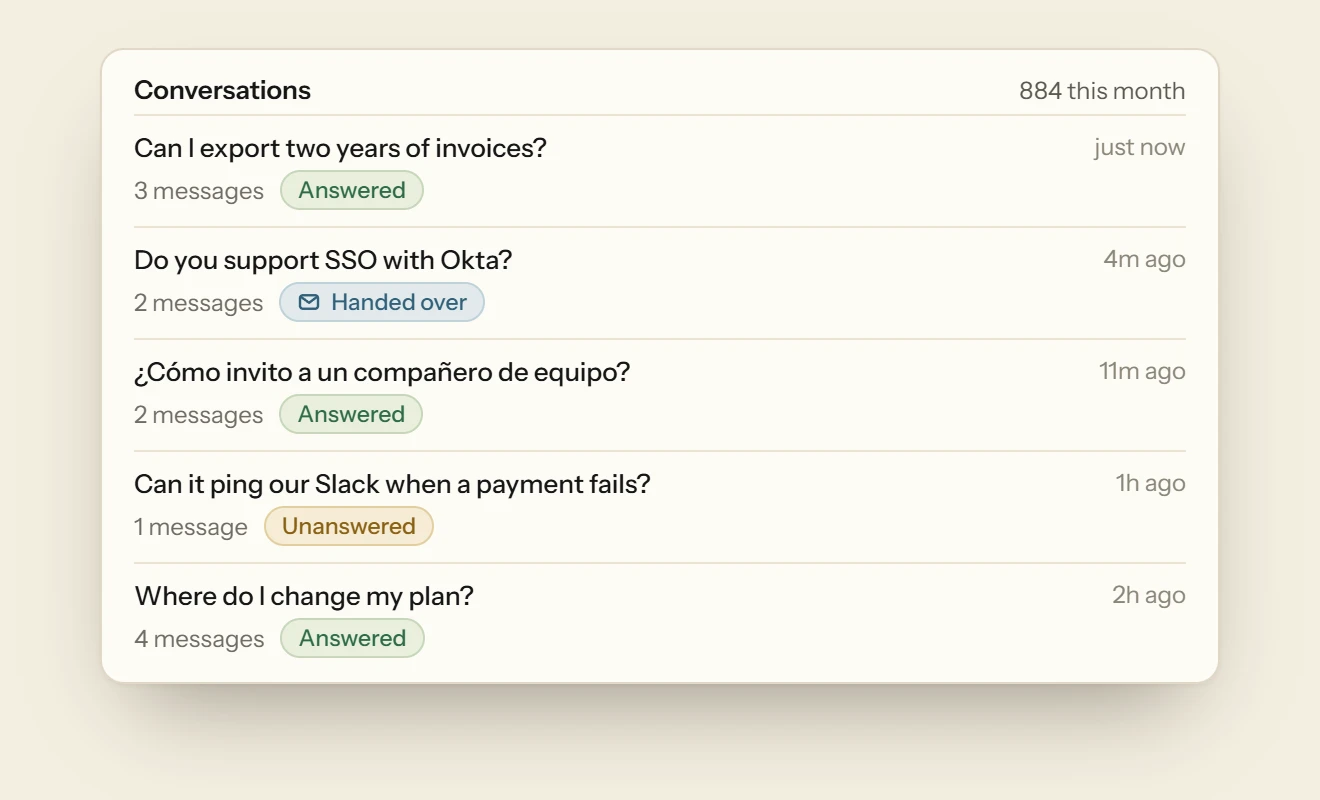
Deacon saves every conversation, searchable by what visitors asked. On Analytics › Widget, Topics group similar questions, count the people who asked, and give a topic a type, such as bug report, feature ask or how-to, when one kind of question leads it. What they ask you to build, on the same page, lists feature asks in your customers’ own words, with asks about the same thing grouped together and the most-asked first. The page’s headline says how many questions Deacon answered, and Handled alone counts the conversations it finished without you.
What needs you, on both Analytics pages, puts what to do first in one list, opening with a single Start here sentence. It runs from people waiting for your reply, to bug reports from visitors beside your site’s own JavaScript errors, to account and billing questions and what Deacon didn’t know. A bug report copies as Markdown for a coding agent such as Claude Code or Cursor in one click.
Questions about AI customer service
How can AI be used for customer service?
AI is used mostly to answer the questions your help content already covers, in a chat or by email, at any hour and in the customer’s language. It can also hand a conversation to a person with a summary, draft replies for a human agent, group questions by topic, and, in products built to act, carry out changes such as refunds within rules you set.
How much does AI customer service cost?
Tools for small teams start free and bill by the outcome, the resolution, the conversation, credits or a set plan price. On 24 November 2026, Fin charged $0.99 an outcome, HubSpot’s Customer Agent $0.50 a resolution, Help Scout $0.75 a resolution and Zendesk $2.00 an automated resolution past its allowance. The billing section above has each vendor’s unit, and our chatbot pricing guide works out a whole month.
Is there free AI customer service?
For a business, there are a few ways in. Deacon has a free plan with every feature, which needs no card and doesn’t expire. Fin’s 14-day trial and Gorgias’s 7-day trial end, and Help Scout gives a new account three months of free AI resolutions before they cost $0.75 each. Tidio gives every account 50 Lyro conversations once, and they don’t renew. For a customer, the AI on a company’s site costs nothing to use, since the company pays for it.
What is the best AI for customer service?
The best AI for customer service is the one built for whoever answers your customers. For a founder or a small team answering support themselves, Deacon answers from your own content, hands you the rest and shows you what customers ask, starting on a free plan. A Shopify store that needs orders changed suits Gorgias’s AI Agent. A support team already on a helpdesk suits that helpdesk’s AI, such as Fin, Zendesk’s AI agents or Help Scout’s Scout, and a company on Salesforce suits Agentforce. AI customer service agents compared prices them side by side, and the best AI chatbots for customer service ranks the chatbots that suit a small team. Our guide to the customer support chatbot sets out its three kinds, from a helpdesk’s own AI to one you build on a model.
Is AI customer support the same as AI customer service?
Yes. Vendors use both names for the same thing, software that answers customers’ questions and gets the rest to a person. Deacon calls itself an AI customer support agent, and everything on this page holds whichever name a vendor uses.
Will AI replace customer service?
Not all of it. AI customer service takes the questions your content answers, at any hour, and passes on the ones that need judgement, an account or someone who can make an exception. For a founder, that means fewer interruptions, with the conversations that need you still coming to you. Will AI replace customer service? looks at what companies and researchers have found.
Can AI customer service answer in other languages?
Most can, since the language models behind them write in many languages. Deacon replies in the language of the customer’s latest message, even when everything you’ve written is in English, and the chat window’s own words come in English and 40 other languages. Multilingual chatbot shows how to check replies in a language you don’t read.
What doesn’t Deacon do?
Deacon answers in a chat on your website. It takes no actions in other systems, and it has no ticketing, no helpdesk integrations, no phone or voice agent, no WhatsApp, Instagram or SMS channel and no support inbox for email. If you need an AI that refunds orders, Gorgias, Fin and Agentforce are built for it, and if your customers mostly phone you, a voice product will suit you better.
Try it on your own documentation
Add your help pages, ask it the question you know your docs cannot answer, and watch it say so.
The free plan covers 50 answers a month on one seat, and the paid plans are on the pricing page.
Free plan, no card.
READ NEXT
Conversational AI for customer service, explained
What conversational AI for customer service does when someone writes in, how it differs from scripted bots and AI agents, and one chat followed turn by turn.
AI customer service agents compared, with prices
See what eleven AI customer service agents act on and how each bills, from Fin to Agentforce and Sierra, with prices read on 24 November 2026.
Will AI replace customer service? What it can’t do
Will AI replace customer service? Not all of it. What AI answers well, what still needs a person, where the handover sits and what it means for support jobs.